Google Reviews help millions of people decide where to shop, eat, stay, and get services. If you’ve left reviews in the past, you may want to find them again to edit, update, or delete them.
Whether you’re using an Android phone, iPhone, Windows PC, or Mac, Google makes it easy to access all your reviews from your Google account.
In this guide, you’ll learn how to find your Google reviews, manage them, troubleshoot common issues, and understand how Google Reviews work.
Quick Answer
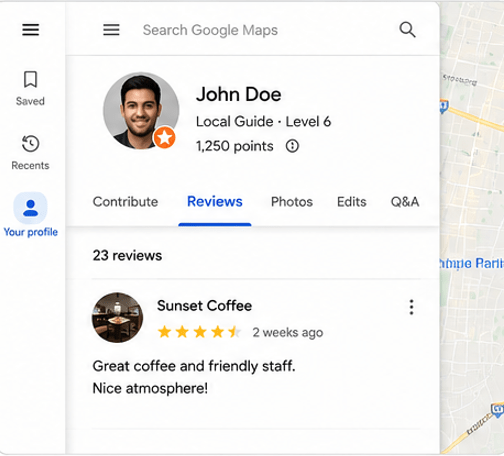
To find your Google Reviews:
- Open Google Maps or visit Google Search.
- Sign in to your Google account.
- Click your profile picture.
- Select Your Profile (or Your Contributions in Google Maps).
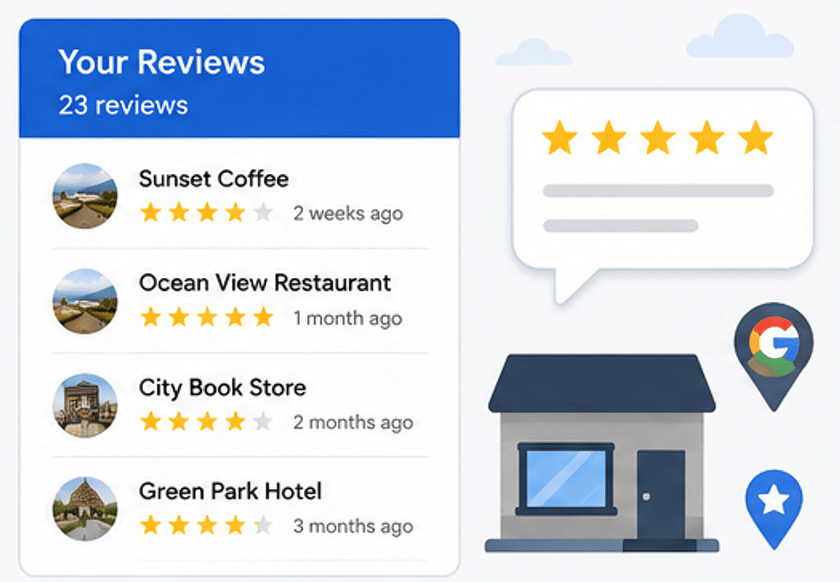
- Open the Reviews tab.
- You’ll see every Google review you’ve written.
What Are Google Reviews?
Google Reviews are ratings and comments that users leave about businesses, restaurants, hotels, attractions, stores, and other places listed on Google.
Reviews usually include:
- Star rating (1–5 stars)
- Written feedback
- Photos or videos (optional)
- Date posted
- Business information
These reviews help other people make informed decisions while helping businesses improve their services.
Why You Might Want to Find Your Google Reviews
People often search for their Google reviews because they want to:
- Read previous reviews
- Edit outdated information
- Fix mistakes
- Delete an old review
- Add photos later
- Check review history
- See businesses they’ve reviewed
- Manage their online activity
How to Find My Google Reviews on a Computer
If you’re using Windows, Mac, Linux, or Chromebook:
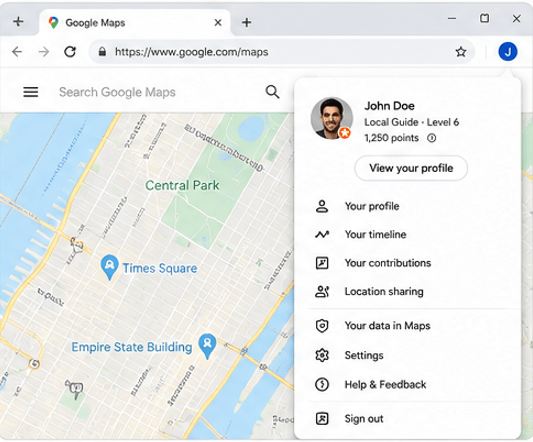
Step 1: Open Google Maps
Visit Google Maps in your web browser.
Step 2: Sign In
Log into the Google account you used when writing the reviews.
Step 3: Click Your Profile
Select your profile picture in the top-right corner.
Step 4: Open Your Profile
Choose:
- Your Profile
- Or Your Contributions (depending on Google’s interface)
Step 5: Click Reviews
Open the Reviews section.
Here you’ll find:
- All reviews
- Star ratings
- Photos
- Dates
- Businesses you’ve reviewed
How to Find My Google Reviews on Android
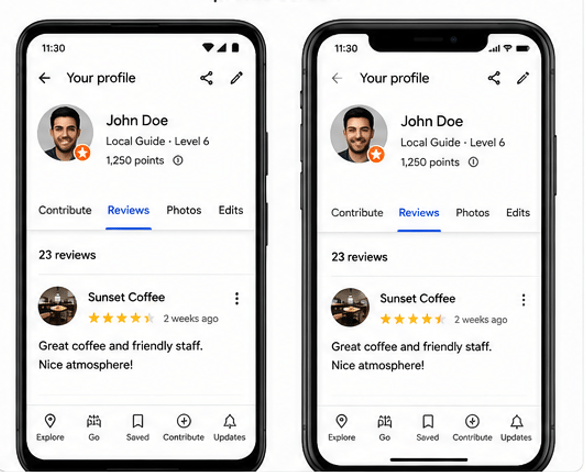
Android users can access reviews directly from Google Maps.
Steps
- Open Google Maps.
- Tap your profile picture.
- Tap Your Profile or Your Contributions.
- Select Reviews.
You’ll now see all your published reviews.
How to Find My Google Reviews on iPhone
The process on iPhone is nearly identical.
Steps
- Open Google Maps.
- Sign in.
- Tap your profile icon.
- Open Your Profile.
- Tap Reviews.
Your review history appears immediately.
How to Find Google Reviews Using Google Search
You don’t always need Google Maps.
Simply:
- Open Google Search.
- Sign in.
- Search:
My Google Reviewsor
My Contributions GoogleGoogle may display a shortcut directly to your review history.
How to Edit a Google Review
You can update any review you’ve written.
Steps
- Find your review.
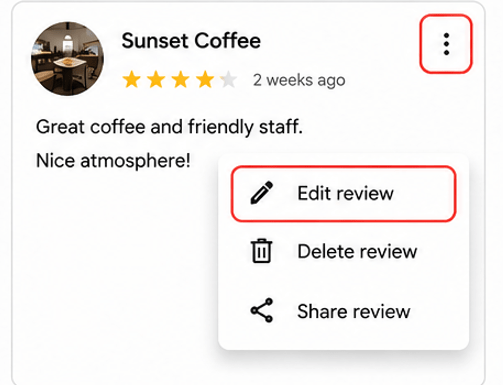
- Click or tap the three dots.
- Choose Edit Review.
- Update:
- Rating
- Text
- Photos
- Save changes.
Edits appear shortly after updating.
How to Delete a Google Review
If you no longer want a review visible:
- Open your Reviews list.
- Click the three dots.
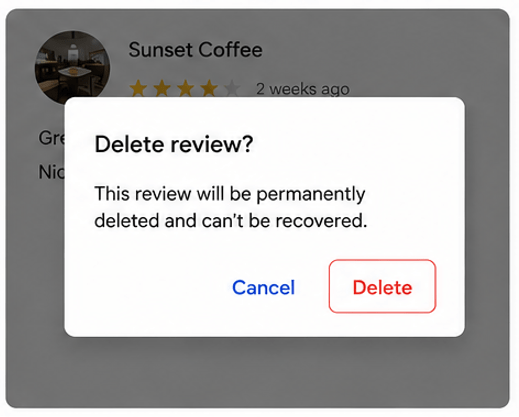
- Select Delete Review.
- Confirm deletion.
Once removed, the review disappears from your profile.
Can You Recover a Deleted Google Review?
Generally, no.
After deleting a review, Google usually cannot restore it.
If you accidentally delete one, you’ll need to write a new review from scratch.
Why Can’t I Find My Google Reviews?
Several reasons may explain why your reviews aren’t visible.
You’re Signed Into the Wrong Account
Many users have multiple Google accounts.
Try switching accounts.
Review Was Removed
Google may remove reviews that violate its policies, including:
- Spam
- Fake reviews
- Offensive language
- Promotional content
- Conflict of interest
Internet Connection Problems
Poor internet may prevent reviews from loading.
Refresh the page or reconnect to Wi-Fi.
Google Sync Delay
Sometimes updates take several hours before appearing.
Waiting usually solves the issue.
Business Listing Was Removed
If a business has been permanently removed from Google Maps, your review may no longer be accessible in the usual way.
How to See Reviews You’ve Left on Businesses
Every review is stored inside your Google profile.
You’ll see:
- Restaurants
- Hotels
- Shopping stores
- Hospitals
- Cafes
- Salons
- Tourist attractions
- Local services
- Parks
- Repair shops
Everything is organized chronologically.
Can Other People See My Google Reviews?
Yes.
By default, Google Reviews are public.
Others may see:
- Your display name
- Profile photo
- Review text
- Star rating
- Photos you’ve uploaded
- Number of reviews you’ve written
How to Manage Your Google Reviews
Good review management includes:
Update Old Reviews
Businesses change over time.
Updating your experience keeps information accurate.
Remove Incorrect Reviews
Delete reviews that contain mistakes.
Add Helpful Details
Include:
- Customer service
- Product quality
- Pricing
- Cleanliness
- Waiting time
- Parking
- Accessibility
These details help future customers.
Tips for Writing Better Google Reviews
Helpful reviews usually include:
- Honest experiences
- Specific details
- Balanced opinions
- Clear language
- Recent visits
Avoid:
- Personal attacks
- Fake information
- Spam
- Promotional links
- Offensive language
Google Review Privacy Explained
Google Reviews are tied to your Google account.
Although your email address isn’t shown publicly, your profile name and review history may be visible to others.
You can adjust profile visibility through your Google account settings.
Can Businesses Delete Your Google Review?
No.
Businesses cannot directly delete customer reviews.
However, they can report reviews that violate Google’s policies.
Google reviews reported for spam, harassment, or fake content may be removed after review.
How to Add Photos to an Existing Google Review
You don’t need to create a new review.
Simply:
- Open your review.
- Select Edit.
- Add photos.
- Save.
Your updated review will include the new images.
What Happens If You Edit a Google Review?
When edited:
- Rating updates instantly
- Text changes
- Photos can be added or removed
- Date may reflect the latest edit
Businesses aren’t always notified, but the updated review becomes visible after processing.
Best Practices for Managing Your Google Reviews
For the best experience:
- Review businesses honestly.
- Keep reviews updated.
- Remove outdated information.
- Avoid duplicate reviews.
- Follow Google’s review policies.
- Use descriptive titles when possible.
- Include useful details for readers.
Common Problems and Solutions
| Problem | Solution |
|---|---|
| Can’t find reviews | Check you’re signed into the correct Google account |
| Reviews missing | Wait for Google to sync changes |
| Review disappeared | It may have been removed for policy violations |
| Can’t edit review | Refresh Google Maps and try again |
| Business missing | The listing may have been removed |
| App not loading | Update Google Maps and restart your device |
Read Our Guide On:
How to Pause Location on Find My iPhone
Frequently Asked Questions
How do I find all my Google Reviews?
Open Google Maps, tap your profile, select Your Profile or Your Contributions, then open the Reviews tab.
Can I edit my Google Review after posting it?
Yes. You can edit the rating, text, and photos at any time.
Why can’t I see my Google Review?
You may be using the wrong Google account, the review may still be syncing, or it may have been removed for violating Google’s policies.
Can I delete my Google Review?
Yes. Open your review, select the three-dot menu, and choose Delete Review.
Are Google Reviews public?
Yes. Most Google Reviews are publicly visible along with your Google profile name and profile picture.
Can businesses remove my review?
Businesses cannot delete reviews directly, but they can report reviews that violate Google’s guidelines.
Can I recover a deleted Google Review?
No. Deleted reviews generally cannot be restored, so you’ll need to create a new one if necessary.
Can I add photos after posting a review?
Yes. Edit your existing review and upload additional photos.
Read Our Guide On:
How to Clean Laptop Fan Safely (Step-by-Step Guide)
Conclusion
Finding your Google Reviews is simple once you know where to look. Whether you’re using Google Maps on your phone or a web browser on your computer, your review history is available through your Google profile. From there, you can edit ratings, update comments, add photos, or delete reviews you no longer want to keep.
Regularly reviewing your past feedback helps keep your contributions accurate and useful for other users while ensuring your online activity reflects your current experiences. By following the steps in this guide, you can easily manage your Google Reviews with confidence.

Mehtab Hassan is the founder and tech writer at Brozly, where he publishes easy-to-understand articles on AI, software, cybersecurity, smartphones, laptops, and emerging technology. His goal is to help readers make smarter tech decisions through detailed reviews, practical tutorials, and beginner-friendly guides. He is passionate about exploring the latest innovations and delivering accurate, up-to-date content that everyone can understand.