Creating presentations, documents, and websites can take hours if you start from scratch. Gamma AI aims to solve that problem by using artificial intelligence to generate polished content in just a few minutes.
In this Gamma AI review, we’ll explore its features, pricing, ease of use, strengths, weaknesses, and how it compares with traditional presentation software like PowerPoint and Google Slides.
Whether you’re a student, marketer, business owner, teacher, or content creator, this guide will help you decide if Gamma AI is worth using.
Quick Answer
Gamma AI is an AI-powered presentation and document creation platform that helps users generate professional presentations, webpages, reports, and documents using simple text prompts.
Rating Summary
| Category | Rating |
|---|---|
| Ease of Use | (5/5) |
| AI Features | (5/5) |
| Templates | (4/5) |
| Collaboration | (5/5) |
| Customization | (4/5) |
| Value for Money | (4/5) |
Overall Rating: ⭐⭐⭐⭐⭐ (4.7/5)
What Is Gamma AI?
Gamma AI is an AI-powered content creation platform designed to build:
- Presentations
- Reports
- Documents
- Websites
- Pitch decks
- Portfolios
- Study notes
- Training materials
Instead of manually designing slides, users simply describe what they need, and Gamma automatically creates visually appealing content complete with layouts, images, icons, and formatting.
The platform removes much of the repetitive work involved in presentation design.
Who Should Use Gamma AI?
Gamma AI works well for:
- Students
- Teachers
- Business professionals
- Marketing teams
- Startup founders
- Sales representatives
- Consultants
- Freelancers
- HR teams
- Content creators
It is especially useful for people who want professional presentations without spending hours designing slides.
Key Features of Gamma AI
1. AI Presentation Generator
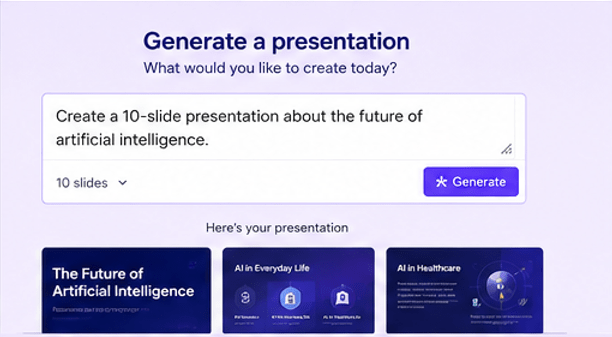
The main feature is its AI presentation generator.
Simply enter a prompt like:
“Create a 10-slide presentation about cybersecurity trends.”
Within minutes, Gamma produces a complete presentation including:
- Titles
- Content
- Layouts
- Images
- Icons
- Charts
- Formatting
2. AI Document Creator
Gamma doesn’t just build presentations.
It can also generate:
- Reports
- Research summaries
- Business proposals
- Meeting notes
- Project documentation
- Marketing plans
Everything is automatically formatted for readability.
3. AI Website Builder
One unique feature is creating simple websites from prompts.
Examples include:
- Product landing pages
- Event pages
- Company profiles
- Portfolio websites
- Personal pages
This makes Gamma more versatile than traditional presentation software.
4. Beautiful Templates
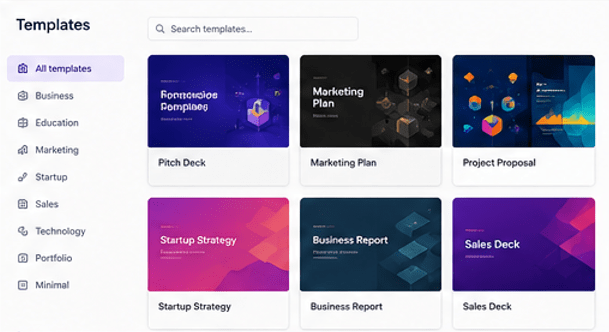
Gamma includes numerous professionally designed templates.
Categories include:
- Business
- Education
- Startup
- Marketing
- Technology
- Sales
- Finance
- Healthcare
Each template is modern, responsive, and easy to customize.
5. Smart Design Suggestions
Instead of manually adjusting every slide, Gamma automatically:
- Balances layouts
- Chooses spacing
- Matches colors
- Formats headings
- Aligns images
- Organizes sections
This saves significant design time.
6. Collaboration Tools
Teams can collaborate in real time by:
- Sharing projects
- Leaving comments
- Editing together
- Tracking updates
- Presenting online
This makes Gamma suitable for remote teams.
7. Interactive Presentations
Unlike traditional slide decks, Gamma presentations support:
- Videos
- GIFs
- Interactive cards
- Buttons
- Live embeds
- Charts
- Web content
The result feels more like a modern webpage than a static slideshow.
8. AI Image Integration
Gamma integrates AI-generated visuals and stock images to improve presentation quality without requiring separate design tools.
9. Import Existing Files
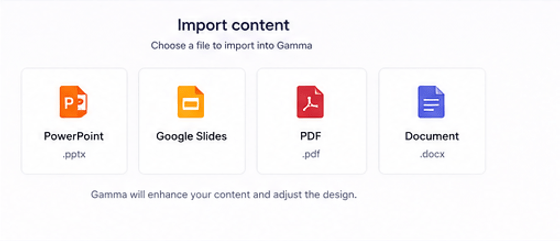
Users can import:
- PowerPoint presentations
- Google Slides
- PDFs
- Documents
Gamma then enhances and redesigns the content.
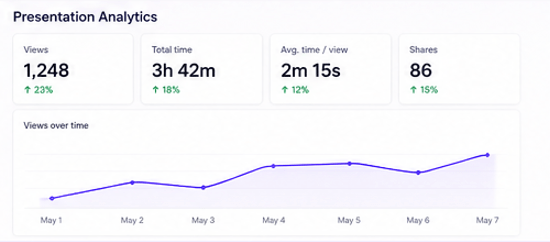
10. Analytics
Presentation owners can view engagement metrics such as:
- Views
- Time spent
- Reader activity
- Sharing statistics
This feature is especially useful for businesses and sales teams.
User Interface and Ease of Use

Gamma has one of the cleanest interfaces among AI presentation tools.
The dashboard is minimal, making it easy for beginners to:
- Create projects
- Edit content
- Add media
- Rearrange sections
- Export presentations
Most users can learn the platform in under 15 minutes.
Gamma AI Performance
In testing, Gamma performs well in several areas:
Speed
Presentation generation usually takes under two minutes.
Design Quality
Layouts look polished without requiring manual adjustments.
AI Writing
Generated text is generally accurate and readable, although some editing may improve tone and factual accuracy.
Reliability
The platform remains responsive even when working with larger presentations.
Gamma AI Pricing
Gamma offers both free and paid plans.
Free Plan
Includes:
- Limited AI credits
- Basic templates
- Standard sharing
- Basic exports
Ideal for occasional users.
Paid Plans
Paid subscriptions typically include:
- More AI generation credits
- Premium templates
- Advanced branding
- Better export options
- Priority support
- Team collaboration features
Pricing may change over time, so check Gamma’s official website for the latest details.
Pros and Cons
Pros
- Extremely easy to use
- Fast AI presentation creation
- Attractive templates
- Excellent design automation
- Interactive presentations
- Team collaboration
- Good free version
- Saves significant time
- Works in a browser
- Modern interface
Cons
- AI content sometimes needs editing
- Limited customization compared to PowerPoint
- Free plan has AI credit limits
- Advanced branding requires a paid plan
- Internet connection required
Gamma AI vs PowerPoint
| Feature | Gamma AI | PowerPoint |
|---|---|---|
| AI Presentation Creation | ✅ Excellent | Limited |
| Templates | Excellent | Very Good |
| Collaboration | Excellent | Good |
| Design Automation | Excellent | Moderate |
| Offline Use | No | Yes |
| Learning Curve | Easy | Moderate |
| Interactive Content | Excellent | Good |
| AI Writing | Built-in | Limited |
If your priority is speed and AI automation, Gamma has an advantage. If you need detailed manual control or offline editing, PowerPoint remains a strong choice.
Gamma AI vs Google Slides
| Feature | Gamma AI | Google Slides |
|---|---|---|
| AI Content Generation | Excellent | Limited |
| Design Quality | Higher | Good |
| Collaboration | Excellent | Excellent |
| Templates | Better | Basic |
| Interactive Elements | More Advanced | Standard |
| Ease of Use | Excellent | Excellent |
Gamma stands out for AI-powered creation and visually rich presentations, while Google Slides is better suited for traditional collaborative editing.
Best Use Cases
Gamma AI is ideal for:
Business
- Pitch decks
- Sales presentations
- Client proposals
Education
- Classroom lessons
- Study notes
- Research presentations
Marketing
- Campaign reports
- Product launches
- Strategy presentations
Freelancers
- Portfolios
- Service proposals
- Client reports
Startups
- Investor decks
- Business plans
- Product showcases
Is Gamma AI Good for Students?
Yes.
Students can quickly create:
- Class presentations
- Assignment reports
- Project summaries
- Research papers
- Visual study guides
The AI significantly reduces the time required for formatting and design.
Read Our Guide On:
Is Gamma AI Safe?
Gamma uses standard security practices for cloud-based collaboration. As with any online productivity tool, avoid uploading confidential or highly sensitive information unless you are comfortable with the platform’s privacy policies and organizational controls.
Tips for Getting Better Results
To make the most of Gamma AI:
- Use detailed prompts.
- Specify your audience.
- Define the number of sections or slides.
- Ask for charts where appropriate.
- Review AI-generated facts before presenting.
- Add your branding and company colors.
- Replace generic images with custom visuals when needed.
Common Limitations
Although Gamma AI is impressive, it isn’t perfect.
Some limitations include:
- AI may generate generic wording.
- Complex technical topics may require manual editing.
- Custom animations are limited compared to PowerPoint.
- Offline editing isn’t available.
- Advanced brand customization is restricted on lower-tier plans.
Read Our Guide On:
Frequently Asked Questions
Is Gamma AI free?
Yes. Gamma offers a free plan with limited AI credits and core features. Paid plans unlock additional capabilities and higher usage limits.
Can Gamma AI create presentations automatically?
Yes. You can generate complete presentations from a text prompt, including layouts, visuals, and formatted content.
Does Gamma AI support teamwork?
Yes. Multiple users can collaborate, comment, edit, and share presentations in real time.
Can I export Gamma presentations?
Yes. Gamma supports exporting and sharing presentations through various formats and online links, though available export options may depend on your subscription.
Is Gamma AI better than PowerPoint?
Gamma is generally better for fast AI-generated presentations and modern web-style designs. PowerPoint offers more advanced manual customization and offline functionality.
Does Gamma AI work on mobile devices?
Yes. Gamma is web-based and can be accessed through modern mobile browsers, though creating and editing content is generally easier on a desktop or laptop.
Can Gamma AI generate websites?
Yes. In addition to presentations and documents, Gamma can generate simple, responsive web pages from text prompts.
Read Our Guide On:
Zendesk Review 2026: Features, Pricing, Pros & Cons
Final Verdict
Gamma AI is one of the best AI-powered presentation tools available today. It combines artificial intelligence with modern design to help users create presentations, documents, and simple websites in minutes rather than hours.
Its intuitive interface, attractive templates, and collaborative features make it an excellent choice for students, educators, professionals, marketers, and startups. While advanced users may occasionally want more design control, Gamma delivers outstanding value for anyone looking to save time and produce polished content quickly.
If your goal is to create professional presentations with minimal effort, Gamma AI is well worth trying, especially if you’re comfortable working in a cloud-based environment.
Read Our Guide On:
HeyGen AI Review: Honest Features & Pricing

Mehtab Hassan is the founder and tech writer at Brozly, where he publishes easy-to-understand articles on AI, software, cybersecurity, smartphones, laptops, and emerging technology. His goal is to help readers make smarter tech decisions through detailed reviews, practical tutorials, and beginner-friendly guides. He is passionate about exploring the latest innovations and delivering accurate, up-to-date content that everyone can understand.