In today’s fast-moving digital world, staying productive is more important than ever. Whether you are a student, freelancer, business owner, content creator, or office worker, managing tasks efficiently can make a big difference in your daily life. This is where artificial intelligence comes in.
AI tools are changing the way people work. They can help you write faster, organize your schedule, automate repetitive tasks, summarize information, generate ideas, and even improve communication. Instead of spending hours on routine work, you can use AI to save time and focus on more important tasks.
If you have ever felt overwhelmed by emails, deadlines, research, content creation, or daily admin work, learning how to use AI tools can be a game-changer. In this guide, you will learn how to boost your productivity with AI tools, which tools are most useful, and how to use them in practical ways without making your workflow complicated.
What Are AI Productivity Tools?

AI productivity tools are software applications powered by artificial intelligence that help people work more efficiently. These tools are designed to support tasks such as writing, planning, scheduling, research, customer support, image creation, note-taking, data analysis, and project management.
Instead of doing everything manually, AI can assist with routine work, suggest ideas, automate repetitive actions, and speed up decision-making. The goal is not to replace human effort but to make work easier, faster, and smarter.
Common Examples of AI Productivity Tools
AI productivity tools can be used in many areas of work. Some common examples include:
- AI writing assistants for articles, emails, captions, and reports
- AI note-taking tools for meetings and summaries
- AI scheduling tools for managing calendars and appointments
- AI chatbots for brainstorming, research, and answering questions
- AI design tools for creating images, presentations, and visuals
- AI automation tools for connecting apps and reducing manual work
- AI transcription tools for turning audio into text
- AI grammar tools for improving clarity and correctness
These tools are useful for both personal productivity and team collaboration.
Why AI Tools Are Important for Productivity

The biggest reason people use AI tools is simple: they save time. Many daily tasks are repetitive, slow, or mentally draining. AI can handle part of that work and reduce the effort needed to complete it.
Here are some of the main ways AI improves productivity:
1. AI Saves Time on Repetitive Tasks
Tasks like replying to emails, formatting content, summarizing notes, creating outlines, and scheduling meetings can take up a large part of your day. AI can automate or speed up these activities so you can spend more time on meaningful work.
2. AI Helps You Work Faster
AI tools can generate first drafts, provide suggestions, and organize information quickly. Instead of starting from scratch, you can use AI to create a base and then improve it with your own ideas.
3. AI Reduces Mental Overload
When you have too many tasks, it becomes difficult to focus. AI can help manage reminders, break down complex tasks, summarize long documents, and keep your workflow organized.
4. AI Improves Accuracy
Many AI tools are designed to catch grammar mistakes, improve writing clarity, organize data, and reduce human errors in routine work. This leads to cleaner and more professional output.
5. AI Supports Better Decision-Making
Some AI tools analyze trends, summarize reports, and provide useful insights. This can help you make faster and better decisions in business, marketing, project planning, or content strategy.
How to Boost Your Productivity With AI Tools
Using AI effectively is not about installing dozens of apps. It is about choosing the right tools for your work and using them in practical ways. Below are some of the best methods to improve productivity with AI.
Use AI for Writing and Content Creation
Writing is one of the most time-consuming tasks for many people. Whether you write blog posts, emails, social media content, product descriptions, reports, or proposals, AI writing tools can help speed up the process.
How AI Helps With Writing
AI writing tools can help you:
- Generate article outlines
- Write first drafts
- Rewrite sentences for clarity
- Fix grammar and spelling
- Create social media captions
- Summarize long content
- Turn rough notes into polished text
- Brainstorm blog ideas and headlines
For example, if you are writing a blog post, AI can help you create a structure, suggest headings, and draft sections. You can then edit the content to match your voice and expertise.
Best Practice
Do not copy and publish AI-generated text without reviewing it. Always edit the content, add your own knowledge, and make sure the information is accurate and helpful.
Use AI to Manage Emails Faster
Email is one of the biggest productivity killers for professionals. Reading, writing, sorting, and responding to messages can consume a lot of time every day.
AI tools can help by:
- Drafting email replies
- Summarizing long email threads
- Prioritizing urgent messages
- Correcting grammar and tone
- Turning short notes into professional responses
This is especially useful for freelancers, business owners, customer support teams, and remote workers who handle a high volume of communication.
Example
Instead of spending 15 minutes writing a client reply, you can use AI to create a polished draft in seconds and then personalize it before sending.
Use AI for Research and Information Gathering
Research often takes a lot of time because it involves reading articles, comparing information, collecting notes, and organizing ideas. AI can speed up this process by summarizing content, answering questions, and helping you understand topics faster.
AI Can Help You:
- Summarize articles, reports, or documents
- Extract key points from long content
- Compare ideas and trends
- Explain difficult topics in simple language
- Generate research questions or content angles
This is very helpful for bloggers, students, marketers, business owners, and content writers.
Important Tip
AI should support research, not replace fact-checking. Always verify statistics, claims, and sensitive information before using it in published content or business decisions.
Use AI for Task Management and Planning
A major part of productivity is not just doing work, but organizing it well. AI-powered planning tools can help you manage tasks, schedules, deadlines, and team workflows.
AI Task Management Tools Can Help You:
- Create to-do lists
- Prioritize important tasks
- Set reminders and deadlines
- Break big projects into smaller steps
- Suggest daily schedules
- Track progress on ongoing work
For people who struggle with staying organized, AI planning tools can make daily work much easier.
Example Workflow
You can ask an AI assistant to create a daily work plan based on your goals, deadlines, and available time. This can help you focus on what matters most instead of jumping between random tasks.
Use AI to Take Better Notes and Summaries
Meetings, classes, brainstorming sessions, and client calls often produce a lot of information. AI note-taking tools can record, transcribe, and summarize conversations automatically.
Benefits of AI Note Tools
- Save time during meetings
- Capture key points automatically
- Generate action items and follow-ups
- Create summaries from long discussions
- Reduce the need for manual note-taking
This is especially useful for teams, students, consultants, and remote workers.
If you attend frequent online meetings, AI note-taking can save hours every week and make it easier to remember important details.
Use AI to Automate Repetitive Work
One of the best ways to boost productivity is by removing repetitive manual tasks. AI automation tools can connect different apps and automate actions between them.
Tasks You Can Automate With AI
- Sending automatic follow-up emails
- Posting content to social media
- Organizing leads from forms
- Updating spreadsheets
- Saving attachments to cloud storage
- Creating reminders from emails or messages
- Sorting customer support requests
Automation reduces manual effort and ensures routine work gets done consistently.
Why This Matters
If you repeat the same task every day or every week, there is a good chance that AI or automation can handle part of it for you.
Use AI to Improve Focus and Time Management
Productivity is not just about speed. It is also about focus. Many people waste time because of distractions, poor planning, or unclear priorities. AI tools can help improve focus by creating better work habits.
AI Can Support Time Management By:
- Building daily work schedules
- Recommending time blocks for tasks
- Tracking how time is spent
- Sending reminders for deadlines
- Helping plan breaks and deep work sessions
For example, you can use AI to create a productivity routine based on your work hours, energy levels, and goals. This can help you stay more consistent and avoid burnout.
Use AI for Brainstorming and Idea Generation
Sometimes productivity drops because you do not know where to start. AI can be extremely useful for brainstorming ideas, generating outlines, and overcoming creative blocks.
You Can Use AI To:
- Find blog topic ideas
- Create marketing campaign concepts
- Generate video titles and captions
- Brainstorm product names or business ideas
- Create outlines for presentations or reports
- Get suggestions for social media content
AI works best as a thinking partner. It can give you a starting point, fresh angles, or new ways to structure your ideas.
Use AI to Improve Team Collaboration
AI is not only useful for individuals. Teams can also use AI tools to improve communication, project management, and workflow efficiency.
AI Can Help Teams By:
- Summarizing meetings and discussions
- Organizing shared notes
- Tracking project progress
- Drafting internal messages or updates
- Creating task lists from meeting outcomes
- Making collaboration smoother across remote teams
When teams spend less time on admin work, they can focus more on strategy, creativity, and results.
Best Areas Where AI Can Save You Time Every Day
If you are just getting started, focus on the areas where AI gives the biggest return. These usually include:
Writing and Editing
AI can speed up blog writing, email drafting, grammar correction, and content repurposing.
Research and Summaries
AI can reduce time spent reading long documents and help you extract useful points faster.
Scheduling and Planning
AI can help organize your day, set priorities, and create structured task lists.
Customer Communication
AI can draft replies, answer common questions, and improve response speed.
Admin and Repetitive Tasks
AI automation can handle routine work such as reminders, updates, sorting, and syncing data.
Popular Types of AI Tools for Productivity
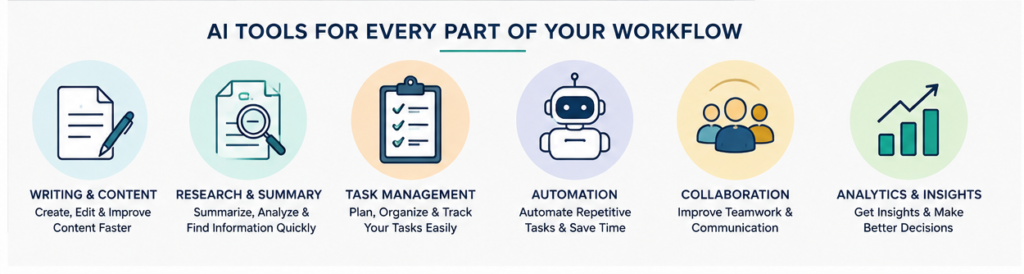
There are many AI tools available, and the right one depends on your needs. Here are the main categories of tools people use to improve productivity:
AI Writing Assistants
Useful for blog posts, emails, social media captions, rewriting, proofreading, and content planning.
AI Chat Assistants
Helpful for brainstorming, research, answering questions, creating outlines, and solving work problems.
AI Note-Taking and Transcription Tools
Great for meetings, interviews, lectures, and call summaries.
AI Project Management Tools
Useful for organizing tasks, assigning deadlines, tracking team progress, and planning work.
AI Design Tools
Helpful for creating visuals, social media graphics, thumbnails, and presentation elements quickly.
AI Automation Platforms
Best for connecting tools and automating repetitive business or workflow tasks.
How to Start Using AI Tools Without Feeling Overwhelmed
Many people are interested in AI but do not know where to begin. The best approach is to start small and solve one problem at a time.
Step 1: Identify Your Biggest Time-Wasting Task
Ask yourself:
- What task do I repeat every day?
- What part of my work feels slow or draining?
- Where do I lose the most time?
This could be writing emails, planning tasks, researching content, or handling admin work.
Step 2: Choose One AI Tool for That Task
Do not try ten tools at once. Start with one tool that solves your biggest problem. For example:
- If you struggle with writing, use an AI writing assistant
- If you struggle with scheduling, use an AI planner
- If you struggle with meetings, use an AI note-taking tool
- If you struggle with repetitive admin tasks, use an automation tool
Step 3: Build a Simple Workflow
Use AI as part of your existing routine. For example:
- Start your day by asking AI to organize your top priorities
- Use AI to draft emails before you edit and send them
- Use AI to create article outlines before writing
- Use AI to summarize meetings and generate action items
The simpler the workflow, the easier it is to keep using it.
Step 4: Review and Improve
Not every AI output will be perfect. Review what the tool gives you, make edits, and improve your prompts over time. The more clearly you ask, the better the results usually become.
Tips for Using AI Tools More Effectively
To get the best productivity benefits, use AI wisely. Here are some practical tips:
Be Clear With Your Instructions
If you want useful output, give the AI a clear task. Instead of saying “write something,” say “write a 150-word professional email reply to a client asking for a deadline extension.”
Use AI as a Helper, Not a Replacement
AI works best when it supports your thinking, not when it completely replaces it. Human judgment, creativity, and editing are still important.
Check Important Information
Always verify facts, dates, statistics, and technical details before using them publicly or professionally.
Create Reusable Prompts
If you often do the same task, save your prompts. For example, keep templates for blog outlines, client emails, meeting summaries, or social media captions.
Focus on High-Value Work
Use AI to handle low-value repetitive tasks so you can spend more time on strategy, creativity, relationships, and decision-making.
Best AI Image Generation Tools
Mistakes to Avoid When Using AI for Productivity
AI can be very helpful, but there are a few common mistakes to avoid.
Using Too Many Tools at Once
Trying every AI app can create confusion and actually reduce productivity. Start with one or two tools that solve real problems.
Trusting AI Without Reviewing
AI can make mistakes, misunderstand instructions, or generate weak content. Always review the output before using it.
Ignoring Privacy and Sensitive Data
Be careful about sharing confidential business information, personal data, or sensitive documents with any tool. Always review privacy policies and security settings.
Depending on AI for Everything
Not every task needs AI. Some work is better done manually, especially when personal judgment, deep creativity, or emotional communication is involved.
Real-Life Ways Different People Can Use AI
For Students
Students can use AI to summarize study notes, explain difficult topics, create revision questions, improve essays, and organize assignments.
For Freelancers
Freelancers can use AI to write proposals, reply to clients, create content faster, manage schedules, and automate admin tasks.
For Bloggers and Content Creators
AI can help with keyword research ideas, outlines, content planning, script writing, social media captions, and image ideas.
For Business Owners
Business owners can use AI for customer support drafts, content marketing, workflow automation, team planning, and reporting.
For Office Professionals
AI can support presentations, emails, meeting notes, project planning, and task prioritization.
The Future of Productivity With AI
AI is becoming a normal part of modern work. As tools continue to improve, they will become even better at understanding context, automating tasks, and supporting everyday workflows.
But the most productive people will not be the ones who use the most AI tools. They will be the ones who use the right tools in the right way. Productivity is not about doing more random tasks. It is about doing the right work more efficiently and with less stress.
AI can help you get there by reducing repetitive work, improving focus, and giving you more time for the tasks that truly matter.
10 Best AI Tools for Students to Study Smarter in 2026
Conclusion
Learning how to boost your productivity with AI tools can make a huge difference in your work and daily routine. AI can help you write faster, organize tasks, summarize information, automate repetitive work, and manage your time more effectively.
The best way to start is simple. Choose one area where you lose time, find one AI tool that solves that problem, and build it into your routine. You do not need to become a tech expert or use dozens of platforms. Even small changes can save hours every week.
When used properly, AI is not just a trend. It is a practical productivity partner that helps you work smarter, stay organized, and focus on what matters most.
FAQs
1. How do AI tools improve productivity?
AI tools improve productivity by automating repetitive tasks, speeding up writing and research, organizing schedules, summarizing information, and helping users manage work more efficiently.
2. What are the best AI tools for productivity?
The best AI tools depend on your needs. Some are useful for writing, some for task management, some for note-taking, and others for automation. The right choice depends on the type of work you do most often.
3. Can beginners use AI productivity tools?
Yes, most AI productivity tools are beginner-friendly. Many are designed with simple interfaces and can help users with everyday tasks like writing, planning, and communication.
4. Are AI tools suitable for students and freelancers?
Yes, AI tools are very useful for students, freelancers, business owners, content creators, and office professionals. They can save time, improve organization, and support better work quality.
5. Should I trust AI-generated content completely?
No, AI-generated content should always be reviewed and edited. AI can make mistakes or produce generic output, so it is important to check facts, improve wording, and add your own input.
6. Is using AI for productivity expensive?
Not always. Many AI tools offer free plans or affordable pricing. You can start with free tools and upgrade later if you need more features.
7. What is the easiest way to start using AI tools?
Start by identifying one task that wastes your time, such as writing emails or organizing tasks. Then choose one AI tool for that specific problem and use it consistently until it becomes part of your workflow.
Read Our Guide On:
Best AI Tools for Real Estate in 2026

Mehtab Hassan is the founder and tech writer at Brozly, where he publishes easy-to-understand articles on AI, software, cybersecurity, smartphones, laptops, and emerging technology. His goal is to help readers make smarter tech decisions through detailed reviews, practical tutorials, and beginner-friendly guides. He is passionate about exploring the latest innovations and delivering accurate, up-to-date content that everyone can understand.