A laptop is one of the most important devices for work, education, entertainment, and everyday tasks. Whether you’re a student, professional, gamer, or casual user, buying a laptop is a significant investment. One of the most common questions people ask before purchasing a new computer is, “How long do laptops last?”
The answer depends on several factors, including the laptop’s build quality, hardware specifications, maintenance, and how it is used. While some laptops remain fast and reliable for many years, others may begin slowing down much sooner.
In this guide, you’ll learn how long laptops typically last, what affects their lifespan, signs that it’s time for an upgrade, and practical tips to make your laptop last as long as possible.
Read Our Guide On:
Is Nimo a Good Laptop Brand? Honest Guide
Average Lifespan of a Laptop
Most laptops last between 3 and 7 years.
However, the actual lifespan varies depending on the type of laptop and how well it is maintained.
Typical Laptop Lifespan
| Laptop Type | Average Lifespan |
|---|---|
| Budget Laptop | 3–4 Years |
| Mid-Range Laptop | 4–6 Years |
| Premium Laptop | 6–8 Years |
| Gaming Laptop | 4–6 Years |
| Business Laptop | 5–8 Years |
| Apple MacBook | 6–10 Years |
Many premium laptops continue working beyond these estimates if properly maintained and upgraded when possible.
Factors That Affect Laptop Lifespan
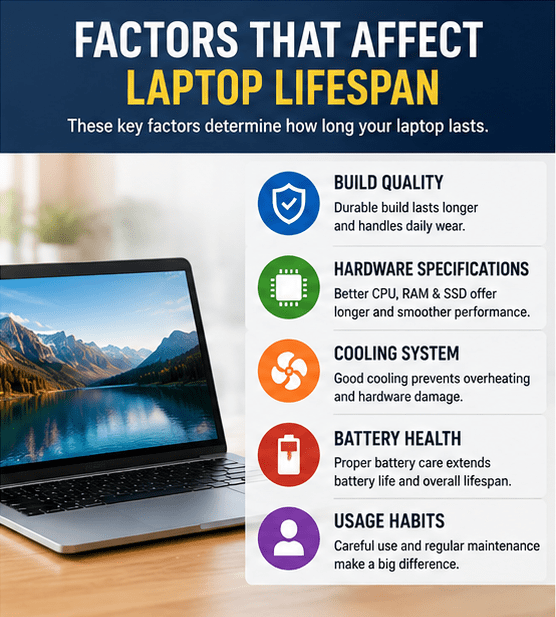
Several factors determine how long a laptop will continue performing well.
Build Quality
High-quality materials generally last longer.
Premium laptops often include:
- Aluminum chassis
- Strong hinges
- Better keyboards
- Durable touchpads
- Improved cooling systems
Budget laptops often use plastic construction, which may wear out more quickly.
Hardware Specifications
The hardware inside your laptop greatly affects its usable life.
Important components include:
- Processor (CPU)
- Memory (RAM)
- Storage (SSD or HDD)
- Graphics card (GPU)
Higher-end hardware remains capable of running modern software for a longer time.
Storage Type
Laptops usually include either:
- SSD (Solid State Drive)
- HDD (Hard Disk Drive)
SSDs provide:
- Faster boot times
- Better reliability
- Lower power consumption
- Improved durability
Most modern laptops now use SSDs because they significantly improve performance.
Cooling System
Heat is one of the biggest enemies of electronics.
Poor cooling can shorten the lifespan of:
- CPU
- GPU
- Battery
- Motherboard
Keeping cooling vents clean helps maintain performance.
Battery Health
Laptop batteries naturally wear out.
Most lithium-ion batteries are designed for 300–1,000 charge cycles, depending on the manufacturer and usage patterns.
Over time you may notice:
- Shorter battery life
- Slower charging
- Unexpected shutdowns
Fortunately, batteries can often be replaced.
How Usage Affects Laptop Lifespan
Different users place different demands on their laptops.
Students
Students mainly use laptops for:
- Research
- Assignments
- Video classes
- Browsing
Their laptops often last 5–7 years.
Office Workers
Office users generally perform:
- Documents
- Spreadsheets
- Video meetings
These laptops commonly last 5–8 years.
Gamers
Gaming places heavy stress on:
- CPU
- GPU
- Cooling system
Gaming laptops typically last 4–6 years before newer games require more powerful hardware.
Creative Professionals
Video editing, graphic design, and 3D rendering demand significant processing power.
Creative professionals often upgrade every 4–6 years to keep up with demanding software.
Signs Your Laptop Is Getting Old
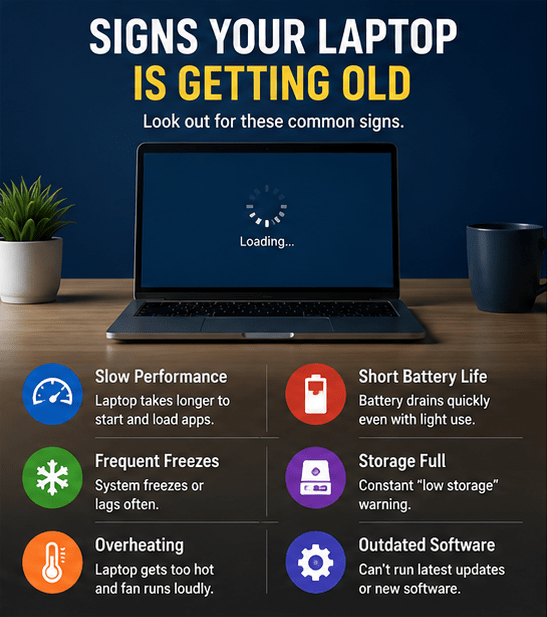
Every laptop eventually shows signs of aging.
Common symptoms include:
- Slow startup
- Programs take longer to open
- Frequent freezing
- Loud cooling fans
- Battery drains quickly
- Overheating
- Limited storage space
- Unable to install new software
- Operating system no longer supported
Experiencing one or two of these issues doesn’t necessarily mean you need a replacement, but several together may indicate it’s time to upgrade.
Can You Make a Laptop Last Longer?
Yes.
Proper maintenance can add several years to a laptop’s life.
Keep Your Laptop Clean
Dust blocks airflow.
Regularly clean:
- Keyboard
- Screen
- Cooling vents
- Fans
- USB ports
A clean laptop runs cooler and performs better.
Avoid Overheating
Always use your laptop on a hard surface.
Avoid placing it on:
- Beds
- Pillows
- Blankets
- Sofas
These surfaces block ventilation.
Consider using a cooling pad during heavy workloads.
Upgrade the RAM
Many laptops allow RAM upgrades.
More RAM helps with:
- Multitasking
- Web browsing
- Office work
- Photo editing
An inexpensive RAM upgrade can noticeably improve performance.
Upgrade to an SSD
If your laptop still uses a hard drive, replacing it with an SSD is one of the best upgrades you can make.
Benefits include:
- Faster startup
- Quicker file transfers
- Faster application loading
- Improved overall responsiveness
Update the Operating System
Software updates improve:
- Security
- Stability
- Compatibility
- Performance
Keep Windows, macOS, or Linux updated whenever possible.
Remove Unused Programs
Over time, unnecessary software accumulates.
Uninstall programs you no longer use.
This helps:
- Free storage
- Reduce background processes
- Improve boot speed
Keep Enough Free Storage
A nearly full drive can reduce performance.
Try to keep:
- At least 20% free storage
This gives the operating system room for temporary files and updates.
Protect Against Malware
Viruses and malicious software can slow down a laptop.
Good security habits include:
- Install trusted software only
- Avoid suspicious downloads
- Keep antivirus software updated
- Update your browser regularly
Handle Your Laptop Carefully
Physical damage is one of the most common reasons laptops fail.
Protect your laptop by:
- Using a padded case
- Avoiding drops
- Keeping liquids away
- Closing the lid gently
Battery Care Tips
To extend battery life:
- Avoid extreme heat
- Don’t leave it plugged in continuously if the manufacturer advises against it
- Use the original charger
- Avoid completely draining the battery frequently
- Enable battery optimization features if available
Does Brand Matter?
Some brands are known for producing durable laptops.
Popular manufacturers include:
The specific model often matters more than the brand itself.
How Long Do MacBooks Last?
MacBooks generally have one of the longest lifespans.
Many users keep them for:
- 6–10 years
Reasons include:
- High build quality
- Long software support
- Efficient hardware
- Strong resale value
How Long Do Windows Laptops Last?
Windows laptops vary widely.
Premium business laptops may last:
- 6–8 years
Budget laptops often last:
- 3–4 years
Performance depends largely on the hardware and maintenance.
Should You Repair or Replace Your Laptop?
Sometimes a repair is more cost-effective than buying a new device.
Consider Repairing If:
- The battery needs replacement
- The SSD has failed
- More RAM is needed
- The keyboard is damaged
- The screen is cracked
Consider Replacing If:
- The motherboard fails
- Repairs cost nearly as much as a new laptop
- The processor is too outdated
- Software updates are no longer supported
- Performance remains poor after upgrades
Tips to Increase Laptop Lifespan
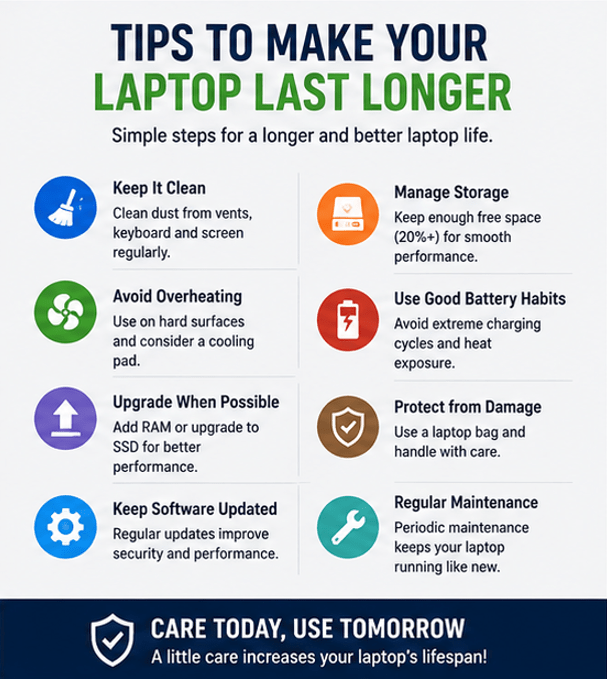
Follow these habits:
- Keep software updated
- Clean dust regularly
- Avoid overheating
- Use an SSD
- Upgrade RAM when possible
- Use a protective laptop bag
- Charge the battery properly
- Remove unnecessary software
- Back up important files
- Restart your laptop regularly
Common Mistakes That Shorten Laptop Life
Avoid these habits:
- Blocking air vents
- Ignoring software updates
- Installing unnecessary programs
- Using counterfeit chargers
- Dropping the laptop
- Eating and drinking near the device
- Running storage completely full
- Never cleaning dust from cooling vents
Best Laptops for Students (2026 Buying Guide)
Frequently Asked Questions
How long do laptops usually last?
Most laptops last between 3 and 7 years, while premium models and MacBooks can often remain reliable for 6 to 10 years with proper care.
Can a laptop last 10 years?
Yes. A well-built laptop used for basic tasks and maintained properly can last around 10 years, though it may not handle the latest software or demanding applications efficiently.
What is the average lifespan of a gaming laptop?
Gaming laptops typically last 4–6 years before hardware limitations affect gaming performance.
How do I know if I need a new laptop?
You may need a new laptop if it frequently crashes, overheats, has poor battery life, cannot run current software smoothly, or repair costs are too high.
Does upgrading RAM increase laptop lifespan?
Yes. Adding more RAM can improve multitasking and overall performance, helping extend the useful life of your laptop.
Is replacing a laptop battery worth it?
In many cases, yes. Replacing a worn-out battery is often much cheaper than buying a new laptop and can restore portability.
Do SSDs make laptops last longer?
While an SSD doesn’t directly increase the physical lifespan of a laptop, it improves speed, reliability, and responsiveness, making the device feel newer for longer.
Read Our Guide On:
How to Screenshot on HP Laptop
Conclusion
Understanding how long do laptops last helps you make smarter purchasing and maintenance decisions. While the average laptop lasts 3 to 7 years, premium models, business laptops, and MacBooks can often remain reliable for much longer with proper care.
Regular maintenance, software updates, careful handling, and occasional hardware upgrades—such as adding RAM or switching to an SSD—can significantly extend your laptop’s lifespan. By following the tips in this guide, you can achieve better performance, improved reliability, and maximize the value of your investment.
Read Our Guide On:
How to Clean Laptop Fan Safely

Mehtab Hassan is the founder and tech writer at Brozly, where he publishes easy-to-understand articles on AI, software, cybersecurity, smartphones, laptops, and emerging technology. His goal is to help readers make smarter tech decisions through detailed reviews, practical tutorials, and beginner-friendly guides. He is passionate about exploring the latest innovations and delivering accurate, up-to-date content that everyone can understand.