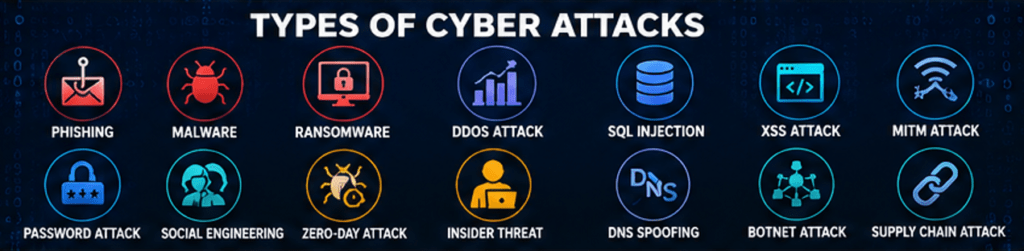
Quick Answer: Types of cyber attacks are different methods hackers use to steal data, disrupt systems, gain unauthorized access, or demand money. The most common types include phishing, malware, ransomware, denial-of-service (DDoS), SQL injection, cross-site scripting (XSS), password attacks, social engineering, man-in-the-middle (MitM), zero-day exploits, insider threats, botnet attacks, DNS spoofing, supply chain attacks, and drive-by downloads. Understanding these threats helps individuals and businesses improve their cybersecurity and reduce risk.
Cyber attacks are increasing every year as more people, businesses, and governments rely on digital technology. Whether you use online banking, shop online, work remotely, or simply browse the internet, you could become a target. Cybercriminals are constantly developing new techniques to steal sensitive information, lock important files, disrupt services, or gain unauthorized access to systems.
According to leading cybersecurity organizations, phishing, ransomware, and credential theft remain among the most common attack methods, while attacks powered by artificial intelligence are becoming more sophisticated. Understanding how cyber attacks work is one of the best ways to protect yourself and your organization.
This guide explains the most common types of cyber attacks, how they work, real-world examples, warning signs, and practical steps you can take to stay secure online.
Key Takeaways
- Cyber attacks target individuals, businesses, and governments.
- Phishing remains the most common type of cyberattack worldwide.
- Malware includes viruses, worms, Trojans, spyware, and ransomware.
- Multi-factor authentication (MFA) and strong passwords significantly reduce risk.
- Keeping software updated helps prevent many attacks.
- Employee awareness and cybersecurity training are essential for organizations.
- Regular backups can reduce the impact of ransomware attacks.
Cyber Attack Risk Levels
| Cyber Attack | Risk Level |
|---|---|
| Phishing | High |
| Malware | High |
| Ransomware | Very High |
| DDoS | High |
| SQL Injection | High |
| Cross-Site Scripting (XSS) | Medium |
| Password Attack | High |
| Social Engineering | High |
| Man-in-the-Middle (MitM) | High |
| Zero-Day Attack | Critical |
| Insider Threat | High |
| DNS Spoofing | Medium |
| Botnet Attack | High |
| Supply Chain Attack | Critical |
| Drive-By Download | Medium |
What Is a Cyber Attack?
A cyber attack is an intentional attempt by cybercriminals to gain unauthorized access to a computer, network, application, or digital device. The attacker may aim to steal sensitive data, install malware, disrupt operations, demand ransom, or spy on users.
Cyber attacks can affect:
- Individuals
- Small businesses
- Large enterprises
- Government agencies
- Schools and universities
- Hospitals
- Financial institutions
Some attacks are carried out by individual hackers, while others involve organized cybercrime groups or even state-sponsored actors.
Read Our Guide On:
Why Are Cyber Attacks Increasing?
Cyber attacks continue to rise because digital technology is becoming part of nearly every aspect of life. More internet-connected devices create more opportunities for attackers.
Common reasons include:
- Increased use of cloud computing
- Remote and hybrid work
- Weak or reused passwords
- Unpatched software vulnerabilities
- Growth of online banking and digital payments
- Expansion of Internet of Things (IoT) devices
- AI-assisted phishing and malware campaigns
As technology evolves, attackers continuously adapt their techniques to exploit new vulnerabilities.
1. What Is a Phishing Attack?
A phishing attack is a cyber attack in which criminals impersonate trusted organizations to trick people into revealing sensitive information such as usernames, passwords, banking details, or credit card numbers.
Phishing usually arrives through:
- Emails
- Text messages (smishing)
- Phone calls (vishing)
- Fake websites
- Social media messages
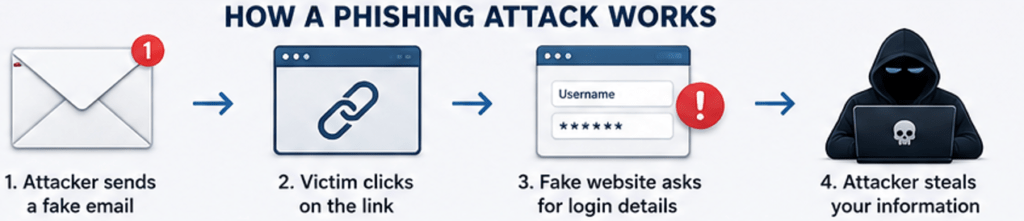
How It Works
The attacker sends a message that appears legitimate. It may claim your account has been suspended, your package is delayed, or your bank needs verification. When you click the provided link, you’re taken to a fake website designed to steal your credentials.
Real-World Example
A fake email claiming to be from Microsoft asks users to reset their password. The link leads to a counterfeit login page where entered credentials are captured by attackers.
Warning Signs
- Urgent or threatening language
- Poor spelling or grammar
- Suspicious links
- Unexpected attachments
- Requests for confidential information
How to Prevent Phishing
- Verify the sender before responding.
- Hover over links before clicking.
- Enable multi-factor authentication.
- Use email spam filters.
- Never share passwords through email.
2. What Is a Malware Attack?
Malware is malicious software designed to damage systems, steal information, monitor user activity, or disrupt normal operations.
Common Types of Malware
- Viruses
- Worms
- Trojans
- Spyware
- Adware
- Rootkits
- Keyloggers
What Can Malware Do?
Depending on its type, malware can:
- Steal passwords
- Record keystrokes
- Delete files
- Encrypt data
- Spy on user activity
- Slow computer performance
- Install additional malicious software
Real-World Example
A user downloads a cracked software program from an unofficial website. Hidden inside the installer is a Trojan that silently steals saved browser passwords.
Prevention Tips
- Install reputable antivirus software.
- Keep your operating system updated.
- Download software only from trusted sources.
- Avoid pirated applications.
- Scan USB drives before opening files.
3. What Is a Ransomware Attack?
A ransomware attack is a type of malware that encrypts files or entire systems and demands payment in exchange for a decryption key.
Ransomware is one of the most damaging cyber threats because it can completely stop business operations.

How Ransomware Spreads
- Phishing emails
- Infected downloads
- Remote Desktop Protocol (RDP) attacks
- Exploited software vulnerabilities
Real-World Example
The WannaCry ransomware attack spread globally in 2017, affecting more than 200,000 computers across over 150 countries. It disrupted hospitals, businesses, and government organizations by encrypting critical files.
Signs of a Ransomware Attack
- Files suddenly become inaccessible.
- File extensions change unexpectedly.
- A ransom note appears on the screen.
- The system becomes locked.
How to Prevent Ransomware
- Maintain offline and cloud backups.
- Install software updates promptly.
- Use endpoint protection software.
- Train employees to recognize phishing attempts.
- Restrict unnecessary administrative privileges.
4. What Is a Distributed Denial-of-Service (DDoS) Attack?
A Distributed Denial-of-Service (DDoS) attack overwhelms a website, server, or network with massive amounts of fake traffic, preventing legitimate users from accessing the service.
Unlike a standard DoS attack, a DDoS attack uses thousands—or even millions—of compromised devices, often organized into a botnet.

Common Targets
- E-commerce websites
- Banks
- Government portals
- Gaming platforms
- Streaming services
Real-World Example
An online shopping website experiences millions of fake requests during a holiday sale, causing the site to crash and preventing customers from placing orders.
Prevention Tips
- Use a Content Delivery Network (CDN).
- Deploy DDoS protection services.
- Configure firewalls and traffic filtering.
- Monitor unusual spikes in network traffic.
5. What Is a Man-in-the-Middle (MitM) Attack?
A Man-in-the-Middle (MitM) attack occurs when a cybercriminal secretly intercepts communication between two parties without their knowledge. The attacker can monitor, steal, or even alter the information being exchanged.
MitM attacks often happen on unsecured public Wi-Fi networks, where users unknowingly connect through a malicious access point.
How It Works
For example, imagine you’re using free Wi-Fi at a coffee shop to log in to your online banking account. If the network is controlled by an attacker, they may capture your username, password, and other sensitive information before it reaches the bank.
Warning Signs
- Unsecured (HTTP) websites instead of HTTPS
- Frequent disconnections on public Wi-Fi
- Unexpected certificate warnings
- Strange login prompts
Prevention Tips
- Use only HTTPS websites.
- Avoid logging into sensitive accounts on public Wi-Fi.
- Use a trusted VPN when using public networks.
- Enable Multi-Factor Authentication (MFA).
6. What Is an SQL Injection (SQLi) Attack?
SQL Injection (SQLi) is a cyber attack that targets websites and applications using databases. Attackers insert malicious SQL commands into input fields to manipulate the database.
What Attackers Can Do
- View confidential records
- Delete database content
- Modify customer information
- Bypass login pages
- Gain administrator access
Example
A vulnerable website search box allows an attacker to enter malicious SQL code, giving them access to customer records stored in the database.
Prevention
- Use parameterized queries.
- Validate and sanitize user input.
- Apply the principle of least privilege.
- Regularly test applications for vulnerabilities.
7. What Is a Cross-Site Scripting (XSS) Attack?
Cross-Site Scripting (XSS) is a web application attack where attackers inject malicious JavaScript into trusted websites. When other users visit the page, the script runs in their browsers.
Risks
- Stealing session cookies
- Hijacking user accounts
- Redirecting users to malicious websites
- Displaying fake login forms
Example
An attacker posts a malicious script in a website comment section. When visitors load the page, the script steals their login session.
Prevention
- Escape and encode output properly.
- Sanitize user input.
- Implement a Content Security Policy (CSP).
- Keep web applications updated.
8. What Is a Password Attack?
A password attack is an attempt to gain unauthorized access by cracking or stealing passwords.
Common Types
Brute Force Attack
The attacker tries every possible password combination until one works.
Dictionary Attack
Instead of every combination, the attacker uses lists of commonly used passwords.
Credential Stuffing
Hackers use usernames and passwords stolen from previous data breaches to access other accounts.
Password Spraying
Attackers test one common password against many accounts to avoid triggering lockout policies.
Prevention
- Use unique passwords for every account.
- Enable MFA.
- Store passwords in a trusted password manager.
- Avoid predictable passwords like “123456” or “password.”
9. What Is a Social Engineering Attack?
Unlike technical attacks, social engineering targets human psychology rather than computer systems.
Attackers manipulate people into revealing confidential information or performing unsafe actions.
Common Examples
- Fake technical support calls
- Business Email Compromise (BEC)
- Fake job offers
- Impersonating coworkers
- USB baiting attacks
Example
An attacker pretends to be the company’s IT department and asks an employee to verify their login credentials.
Prevention
- Verify unexpected requests.
- Never share passwords over the phone.
- Train employees regularly.
- Confirm financial requests through another communication channel.
10. What Is a Zero-Day Attack?
A zero-day attack exploits a software vulnerability before the software developer releases a security patch.
Because no official fix exists initially, these attacks can be extremely dangerous.
Why They’re Dangerous
- Security software may not detect them.
- Organizations have little time to respond.
- They often target high-value organizations.
Prevention
- Apply updates immediately when patches become available.
- Use advanced endpoint protection.
- Monitor unusual system behavior.
- Subscribe to threat intelligence alerts.
11. What Is an Insider Threat?
An insider threat comes from someone who already has authorized access to an organization’s systems.
Insider threats may be:
- Malicious employees
- Careless staff
- Contractors
- Former employees with retained access
Examples
- Copying confidential customer data
- Accidentally exposing sensitive files
- Installing unauthorized software
- Sharing passwords
Prevention
- Limit user permissions.
- Monitor account activity.
- Remove access immediately after employees leave.
- Conduct cybersecurity awareness training.
12. What Is DNS Spoofing?
DNS Spoofing, also called DNS cache poisoning, redirects users to fake websites by altering DNS records.
Victims believe they’re visiting a legitimate website, but they’re actually interacting with a malicious copy.
Risks
- Credential theft
- Financial fraud
- Malware installation
Prevention
- Use trusted DNS providers.
- Check for HTTPS encryption.
- Enable DNS security features where available.
13. What Is a Drive-By Download Attack?
A drive-by download installs malware simply by visiting a compromised website.
Sometimes users don’t even need to click anything—the malicious code exploits browser or plugin vulnerabilities.
Prevention
- Update browsers regularly.
- Remove unnecessary browser plugins.
- Use browser security features.
- Install reputable antivirus software.
14. What Is a Botnet Attack?
A botnet is a network of infected computers or Internet of Things (IoT) devices remotely controlled by attackers.
Botnets are commonly used to launch:
- DDoS attacks
- Spam campaigns
- Cryptocurrency mining
- Credential stuffing attacks
Prevention
- Change default device passwords.
- Update router firmware.
- Secure IoT devices.
- Monitor unusual network traffic.
15. What Is a Supply Chain Attack?
A supply chain attack targets trusted software vendors or service providers instead of attacking the final victim directly.
Once attackers compromise a trusted vendor, malicious updates may be distributed to thousands of customers.
Example
A software vendor unknowingly distributes an infected update, allowing attackers to access customer systems.
Prevention
- Evaluate vendor security practices.
- Verify software updates.
- Monitor third-party access.
- Use application allow-listing.
Comparison of the Most Common Cyber Attacks
| Attack Type | Primary Goal | Typical Target | Difficulty to Detect |
|---|---|---|---|
| Phishing | Steal credentials | Users | Medium |
| Malware | Damage or spy | Devices | Medium |
| Ransomware | Encrypt files | Organizations | High |
| DDoS | Disrupt services | Websites | Medium |
| SQL Injection | Access databases | Web apps | High |
| XSS | Steal browser data | Website users | Medium |
| Password Attack | Crack accounts | Online accounts | Medium |
| MitM | Intercept communication | Network users | High |
| Supply Chain | Compromise trusted software | Organizations | Very High |
Who Is Most at Risk?
Anyone connected to the internet can become a victim, but some groups face greater risk:
- Small businesses
- Healthcare organizations
- Financial institutions
- Government agencies
- Educational institutions
- Remote workers
- Online shoppers
- Smartphone users
- Cloud-based businesses
Signs You May Be Experiencing a Cyber Attack
Watch for these warning signs:
- Computer suddenly becomes slow.
- Unknown programs appear.
- Files disappear or become encrypted.
- Frequent crashes.
- Browser redirects.
- Unexpected password reset notifications.
- Login attempts from unfamiliar locations.
- Antivirus software is disabled.
- Unusual network activity.
- Unauthorized financial transactions.
How to Protect Yourself from Cyber Attacks
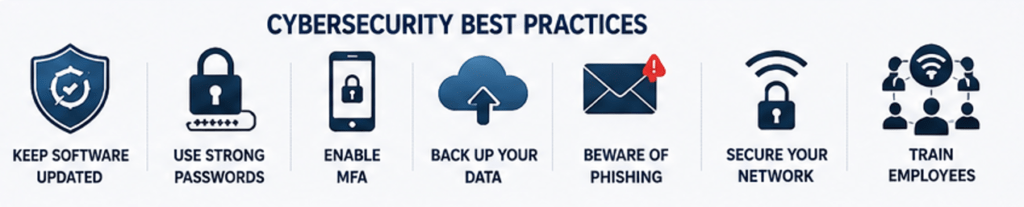
Keep Software Updated
Install security updates for your operating system, browser, applications, and firmware as soon as they become available.
Use Strong, Unique Passwords
Create long passwords using a mix of uppercase and lowercase letters, numbers, and special characters. Never reuse passwords across multiple accounts.
Enable Multi-Factor Authentication (MFA)
MFA adds an extra layer of protection, making it much harder for attackers to access your accounts even if they know your password.
Back Up Important Data
Keep regular backups on secure cloud storage or offline drives. This is especially important for protecting against ransomware.
Install Trusted Security Software
Use reputable antivirus and endpoint protection tools to detect malware and other threats.
Be Careful with Emails and Links
Verify the sender before opening attachments or clicking links. If something feels suspicious, confirm it through another trusted channel.
Secure Your Home Network
- Change default router passwords.
- Use WPA3 or WPA2 encryption.
- Update router firmware.
- Disable unnecessary remote access features.
Expert Cybersecurity Tips
- Think before you click on links or attachments.
- Never reuse passwords across accounts.
- Use a password manager.
- Lock your devices when not in use.
- Regularly review account activity.
- Train employees to recognize phishing attempts.
- Test your backups periodically.
- Monitor for unusual login activity.
Read Our Guide On:
Cyber Hygiene Checklist: 20 Essential Tips to Stay Secure Online
Frequently Asked Questions (FAQs)
What is the most common type of cyber attack?
Phishing is widely considered the most common cyber attack because it exploits human behavior through deceptive emails, text messages, and fake websites to steal sensitive information.
Which cyber attack is the most dangerous?
Ransomware is among the most damaging because it can encrypt critical files, halt business operations, and result in significant financial losses.
Can smartphones be affected by cyber attacks?
Yes. Smartphones are vulnerable to phishing, malicious apps, spyware, ransomware, and attacks over unsecured Wi-Fi networks.
What is the difference between malware and ransomware?
Malware is a broad category of malicious software. Ransomware is a specific type of malware that encrypts files and demands payment for their recovery.
How can businesses reduce cyber attack risks?
Businesses should implement strong access controls, employee training, MFA, regular backups, security monitoring, vulnerability management, and incident response plans.
Are cyber attacks preventable?
While no system is completely immune, following cybersecurity best practices significantly reduces the likelihood and impact of most attacks.
Key Takeaways
- Cyber attacks use different techniques to steal data, disrupt services, or gain unauthorized access.
- Phishing, malware, ransomware, and password attacks remain among the most common threats.
- Technical controls alone are not enough—user awareness is equally important.
- Regular updates, strong passwords, MFA, and backups provide a strong foundation for cybersecurity.
- Staying informed about emerging threats helps individuals and organizations remain resilient.
Conclusion
Cyber attacks continue to evolve in complexity and frequency, making cybersecurity an essential responsibility for everyone. Whether you’re an individual protecting personal information or a business safeguarding customer data, understanding the different types of cyber attacks is the first step toward building stronger defenses.
By recognizing common threats such as phishing, ransomware, malware, SQL injection, social engineering, and supply chain attacks, you can identify warning signs early and take proactive measures to reduce risk. Combining secure technology with good security habits—such as keeping software updated, enabling multi-factor authentication, using strong passwords, and maintaining regular backups—provides effective protection against many modern cyber threats.
Investing time in cybersecurity awareness today can help prevent costly data breaches, financial losses, and disruptions in the future.
Read Our Guide On:
How to Get Into Cyber Security

Mehtab Hassan is the founder and tech writer at Brozly, where he publishes easy-to-understand articles on AI, software, cybersecurity, smartphones, laptops, and emerging technology. His goal is to help readers make smarter tech decisions through detailed reviews, practical tutorials, and beginner-friendly guides. He is passionate about exploring the latest innovations and delivering accurate, up-to-date content that everyone can understand.