Claude AI, developed by Anthropic, is an advanced AI assistant that can summarize lengthy legal documents, explain complex clauses, and identify important information more efficiently.
Legal documents are often lengthy, technical, and time-consuming to review. Whether you’re reading contracts, agreements, court filings, policies, or legal notices, finding the most important information can take hours.
This is where Claude prompts for legal document summarization become useful.
By providing Claude with clear and specific instructions, you can generate concise legal summaries, identify important clauses, highlight potential risks, and organize complex legal information more efficiently. To learn more about Claude’s capabilities and best practices, visit the official Claude Documentation. While AI can significantly improve productivity, it should not replace professional legal advice. Always consult qualified legal professionals, such as those represented by the American Bar Association (ABA), before making legal decisions based on contracts or other legal documents.
In this guide, you’ll learn:
- What legal document summarization is
- Why Claude works well for legal text
- The best Claude prompts for different legal documents
- Prompt writing best practices
- Common mistakes to avoid
- FAQs and expert tips
Important: AI-generated summaries are for informational purposes only and should always be reviewed by a qualified legal professional before making legal decisions.
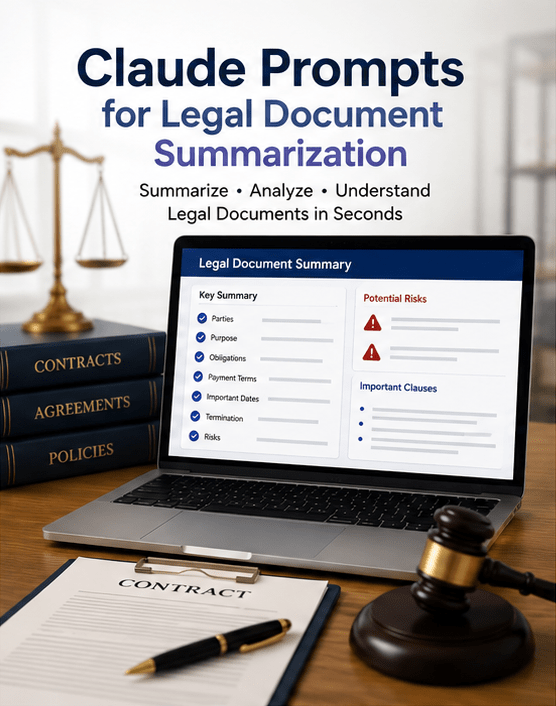
What Are Claude Prompts for Legal Document Summarization?
Claude prompts are instructions that tell Claude exactly how to analyze and summarize legal documents.
Instead of asking:
“Summarize this.”
A better prompt is:
“Summarize this commercial lease agreement into plain English. Highlight the obligations of the landlord and tenant, payment terms, renewal clauses, termination conditions, penalties, and potential legal risks.”
The more specific your prompt is, the more useful the summary becomes.
Why Use Claude for Legal Document Summarization?
Claude performs well with long documents because it can maintain context across lengthy text. You can learn more about Claude in the official Claude documentation.
Benefits include:
- Faster document review
- Easy-to-understand language
- Clause extraction
- Risk identification
- Better organization
- Time savings
- Consistent formatting
- Helpful for research and preparation
Many professionals use AI to assist with:
- Lawyers
- Legal assistants
- Law students
- HR professionals
- Compliance officers
- Business owners
- Procurement teams
- Startup founders
When Should You Use AI for Legal Summaries?
Claude can assist with:
- Initial document review
- Contract comparison
- Lease summaries
- Employment agreements
- Privacy policies
- Terms of service
- NDAs
- Vendor contracts
- Court opinions
- Government regulations
It works best as a productivity tool—not as a replacement for legal expertise.
Types of Legal Documents Claude Can Summarize
Contracts
Claude can summarize:
- Payment obligations
- Deliverables
- Responsibilities
- Termination clauses
- Renewal conditions
Non-Disclosure Agreements (NDAs)
It can identify:
- Confidential information
- Duration
- Exceptions
- Restrictions
- Penalties
Employment Agreements
Useful information includes:
- Salary
- Benefits
- Leave policy
- Non-compete clauses
- Confidentiality
- Termination conditions
Privacy Policies
Claude can explain:
- Data collection
- User rights
- Cookies
- Third-party sharing
- Data retention
Terms and Conditions
It can summarize:
- User responsibilities
- Account rules
- Refund policy
- Limitations of liability
- Dispute resolution
Court Decisions
Claude can organize:
- Facts
- Legal issues
- Arguments
- Court reasoning
- Final judgment
Best Claude Prompts for Legal Document Summarization
Below are practical prompt templates you can copy and customize.
1. General Legal Document Summary
Summarize this legal document in plain English.

Include:

- Purpose
- Main obligations
- Important deadlines
- Financial terms
- Key clauses
- Risks
- Final conclusion

Keep the summary under 500 words.
2. Contract Summary Prompt
Review this contract.

Summarize:

- Parties involved
- Contract purpose
- Payment terms
- Responsibilities
- Termination clauses
- Renewal terms
- Liability
- Important dates

Present everything using bullet points.
3. NDA Summary Prompt
Summarize this NDA.

Identify:

- Definition of confidential information
- Obligations of both parties
- Duration
- Exceptions
- Penalties
- Legal risks
4. Employment Agreement Prompt
Summarize this employment agreement.

Explain:

- Salary
- Benefits
- Work schedule
- Confidentiality
- Non-compete clauses
- Termination process
- Employee obligations

Write in beginner-friendly language.
5. Lease Agreement Prompt
Summarize this lease agreement.

Highlight:

- Monthly rent
- Deposit
- Maintenance responsibilities
- Renewal
- Termination
- Property restrictions
- Penalties
6. Privacy Policy Prompt
Explain this privacy policy in simple language.

Cover:

- Data collected
- How data is used
- Third-party sharing
- User rights
- Data retention
- Cookie policy

Avoid legal jargon.
7. Compare Two Legal Documents
Compare these two legal documents.

Create a table showing:

- Similarities
- Differences
- Missing clauses
- Financial differences
- Risk differences

End with a summary.
8. Risk Analysis Prompt
Review this legal document.

Identify:

- High-risk clauses
- Ambiguous wording
- Unusual obligations
- Potential liabilities
- Missing protections

Explain why each item could be risky.
9. Executive Summary Prompt
Create a one-page executive summary.

Include:

- Document purpose
- Key responsibilities
- Financial obligations
- Deadlines
- Risks
- Final recommendations
10. Plain English Prompt
Rewrite this legal document summary so that someone with no legal background can understand it.

Replace legal jargon with simple explanations.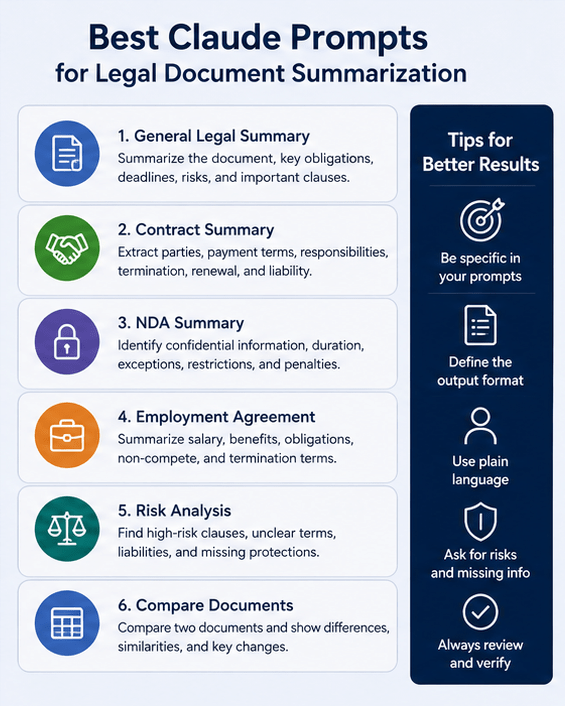
Prompt Engineering Best Practices
Better prompts produce better summaries.
Be Specific
Instead of:
Summarize this.
Use:
Summarize this supplier agreement focusing on payment obligations, liability, delivery timelines, renewal terms, and dispute resolution.
Define the Output Format
For example:
- Bullet points
- Table
- Executive summary
- Timeline
- Checklist
- Section-by-section analysis
Set a Reading Level
Example:
Explain everything in plain English suitable for a high school student.
Request Missing Information
Ask Claude to identify:
- Missing signatures
- Missing dates
- Undefined terms
- Inconsistent clauses
- Potential risks
Limit the Length
For example:
Keep the summary below 300 words.This produces concise results.
Read Our Guide On:
Best AI Tools for Real Estate in 2026
Example Workflow
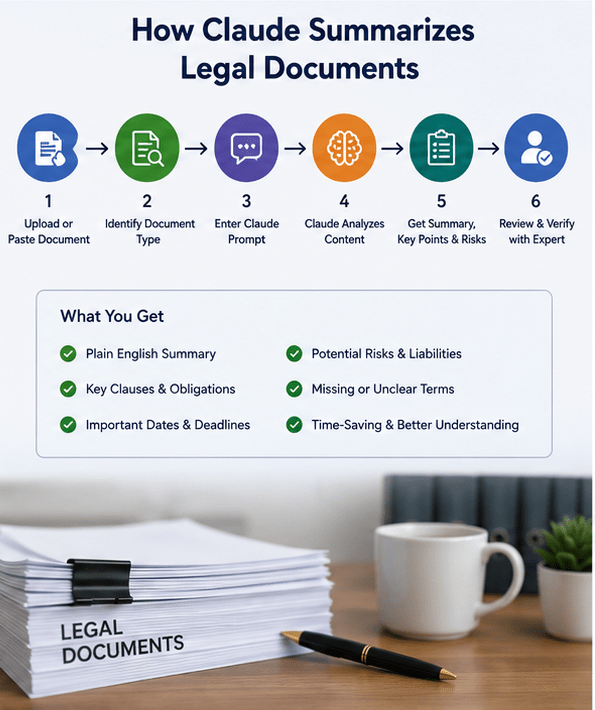
A simple workflow looks like this:
- Upload or paste the legal document.
- Specify the document type.
- Choose the desired summary format.
- Ask Claude to identify risks.
- Request clarification of complex clauses.
- Verify the AI summary manually.
- Consult a legal professional when needed.
Benefits of Using Claude for Legal Summaries
Organizations increasingly use AI to improve productivity.
Major advantages include:
- Saves review time
- Easier understanding
- Better organization
- Quick clause identification
- Faster research
- Helpful for non-lawyers
- Supports document comparison
- Improves workflow efficiency
Limitations of AI Legal Summaries
AI also has limitations.
Keep these in mind:
- AI can misunderstand context.
- Jurisdiction-specific laws may not be fully reflected.
- Important nuances may be omitted.
- Complex litigation requires professional review.
- AI should not be treated as legal advice.
Always verify important legal information with a qualified lawyer.
Tips for Better Claude Results
Follow these practical tips:
- Use complete documents whenever possible.
- Remove irrelevant pages.
- Ask one task at a time.
- Specify the audience.
- Request structured outputs.
- Use follow-up prompts for clarification.
- Verify names, dates, and numbers.
- Review all critical clauses manually.
Common Mistakes to Avoid
Many users make these mistakes:
- Using vague prompts
- Ignoring document context
- Requesting too many tasks at once
- Trusting AI without verification
- Skipping manual review
- Forgetting jurisdiction-specific considerations
Clear prompts usually produce clearer summaries.
Can Claude Summarize Long Legal Documents?
Yes.
Claude is designed to handle lengthy documents better than many AI models. However, very large files may still benefit from being divided into logical sections, such as definitions, obligations, payment terms, and termination clauses. You can then ask Claude to create both section summaries and a final combined overview.
Read Our Guide On:
Frequently Asked Questions
What are Claude prompts for legal document summarization?
They are structured instructions that guide Claude to summarize legal documents, extract key clauses, identify risks, and explain complex legal language in an organized way.
Can Claude summarize contracts accurately?
Claude can create helpful summaries, but its output should always be reviewed by a qualified legal professional before making legal decisions.
Can Claude identify risky contract clauses?
Yes. With the right prompt, Claude can highlight clauses related to liability, indemnification, termination, confidentiality, and other potential risks, though it may not catch every legal nuance.
Which legal documents work best with Claude?
Common examples include contracts, NDAs, employment agreements, lease agreements, privacy policies, terms and conditions, vendor agreements, and court decisions.
Should businesses rely only on AI summaries?
No. AI summaries are useful for saving time and improving understanding, but they should complement—not replace—professional legal review.
How can I improve Claude’s legal summaries?
Use detailed prompts, specify the output format, ask for plain-English explanations, focus on particular clauses, and review the final summary for accuracy.
Read Our Guide On:
Comparing Best AI Image Generation Tools
Conclusion
Using Claude prompts for summarizing legal documents can make reviewing complex legal documents faster, easier, and more organized. Well-crafted prompts help Claude extract key obligations, identify important clauses, explain legal language in plain English, and highlight potential risks.
For the best results, provide clear instructions, define the output format, and always verify AI-generated summaries before relying on them for legal or business decisions. When accuracy matters, combine AI assistance with professional legal expertise to ensure informed and reliable outcomes.
Read Our Guide On:
How to Fix Midjourney Blurred Text Error

Mehtab Hassan is the founder and tech writer at Brozly, where he publishes easy-to-understand articles on AI, software, cybersecurity, smartphones, laptops, and emerging technology. His goal is to help readers make smarter tech decisions through detailed reviews, practical tutorials, and beginner-friendly guides. He is passionate about exploring the latest innovations and delivering accurate, up-to-date content that everyone can understand.