What Is the Midjourney Blurred Text Error?
The Midjourney blurred text error happens when the AI creates text that looks:
- Blurry
- Distorted
- Misspelled
- Gibberish
- Missing letters
- Impossible to read
This commonly appears on:
- Posters
- Book covers
- Product packaging
- Logos
- Street signs
- T-shirts
- Business cards
- Advertisements
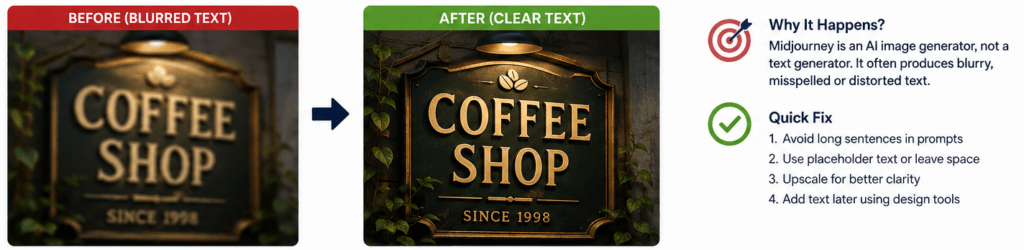
Unlike image editing software, Midjourney is designed to generate images—not perfectly readable typography. It predicts visual patterns rather than individual characters, which is why text often appears incorrect.
Quick Answer
If you’re wondering how to fix Midjourney blurred text error, follow these steps:
- Avoid asking Midjourney to generate long text.
- Use placeholder text instead.
- Generate the artwork without text first.
- Add text later using Canva, Photoshop, Figma, or another editor.
- Increase image quality using Upscale.
- Rewrite prompts to focus on typography.
- Use Version 7 or the latest Midjourney model.
- Generate multiple variations and choose the clearest one.
For professional results, many designers create the image in Midjourney and add the final text afterward.
Why Does Midjourney Create Blurry Text?
Midjourney is an AI image generator.
Its primary goal is creating beautiful images—not accurate writing.
Instead of understanding language like a word processor, it predicts what text should visually resemble inside an image.
Because of this, it may produce:
- Fake words
- Mixed letters
- Random symbols
- Broken fonts
- Blurry typography
This behavior is normal and affects nearly every AI image generator to some extent.
Common Causes of Midjourney Blurred Text
1. Long Sentences
The longer the requested text, the harder it becomes for Midjourney.
Instead of writing:
Welcome to My Coffee Shop Since 1998
Try:
Coffee Shop Sign
2. Small Text Areas
Tiny labels are difficult for AI.
Examples include:
- Product labels
- Phone screens
- Price tags
- Packaging
3. Decorative Fonts
Fancy fonts increase the chance of unreadable letters.
Simple fonts generally produce cleaner results.
4. Low Image Resolution
Small images often make text appear fuzzy.
Upscaling can improve clarity.
5. Complex Backgrounds
Busy scenes make typography difficult to distinguish.
High contrast usually works better.
How to Fix Midjourney Blurred Text Error
Method 1: Remove Text from the Prompt
One of the easiest solutions is generating the artwork without asking Midjourney to write text.
Instead of:
A movie poster with the title “Future World”
Generate:
Cinematic futuristic movie poster with empty title space
Later, add the title yourself.
This approach produces much cleaner results.
Method 2: Use Placeholder Text
Rather than demanding exact wording, describe the placement.
Examples:
- Empty banner
- Blank sign
- Placeholder logo
- Blank label
- Empty billboard
This gives you full control afterward.
Method 3: Use Short Words Only
Short words are easier than long sentences.
Better examples include:
- OPEN
- SALE
- EXIT
- CAFE
Avoid paragraphs.
Method 4: Upscale the Image
After selecting your favorite image:
- Upscale it
- Increase resolution
- Sharpen details
Higher-resolution images make typography appear cleaner.
Method 5: Generate Multiple Variations
Instead of relying on one image:
Generate:
- Variation 1
- Variation 2
- Variation 3
- Variation 4
One version may naturally produce clearer lettering.
Method 6: Use Better Prompt Engineering
Instead of simply saying:
Add text
Try describing the typography.
Example:
Minimal poster with clean typography, centered title space, modern sans-serif design, high contrast, premium brandingThis often improves layout quality.
Method 7: Keep the Background Simple
Busy scenes confuse AI.
Better backgrounds include:
- Solid colors
- Light gradients
- Plain walls
- Minimal textures
This improves text visibility.
Method 8: Add Text After Generation
Professional designers rarely rely on AI for final typography.
A common workflow is:
- Create artwork in Midjourney.
- Export the image.
- Add text in a design application.
- Export the final design.
This produces the most polished results.

Best Midjourney Prompt Examples
Poster
Minimal modern poster, clean composition, blank title area at top, cinematic lighting, high detailLogo
Luxury logo concept with empty typography space, gold emblem, black backgroundProduct Packaging
Premium cosmetic bottle with blank label area, realistic studio lighting, minimalist brandingBook Cover
Fantasy novel cover with empty title space, dramatic lighting, highly detailed illustrationBillboard
Large outdoor billboard with blank advertising space, city background, realistic photographyRead Our Guide On:
Claude Prompts for Legal Document Summarization: Guide (2026)
Midjourney Parameters That May Help
Although parameters cannot guarantee perfect text, they can improve overall image quality.
Useful options include:
- Higher quality settings
- Updated Midjourney model
- Stylize adjustments
- Aspect ratio optimization
- Image references
- Multiple rerolls
Experimenting with these settings often produces cleaner compositions.
Best Practices for AI Typography
Follow these tips consistently.
Do
- Keep prompts simple.
- Leave room for text.
- Use minimal layouts.
- Increase contrast.
- Generate multiple options.
- Upscale final images.
- Add text afterward.
Don’t
- Request long paragraphs.
- Use decorative handwriting.
- Expect perfect spelling.
- Place tiny labels everywhere.
- Crowd the image with details.

Alternative AI Tools for Text Generation
If readable text is your priority, consider combining Midjourney with other tools.
Examples include:
- Adobe Firefly
- Ideogram
- Canva AI
- Microsoft Designer
- Figma AI plugins
Many creators use one AI for artwork and another tool for typography.
Troubleshooting Checklist
If your text is still blurry, check the following:
- ✔ Simplified the prompt
- ✔ Removed unnecessary wording
- ✔ Generated multiple versions
- ✔ Upscaled the image
- ✔ Used the newest Midjourney model
- ✔ Left blank space for typography
- ✔ Added text manually afterward
- ✔ Increased contrast
- ✔ Reduced background clutter
Most users solve the issue by following this workflow.
Read Our Guide On:
Comparing Best AI Image Generation Tools
Frequently Asked Questions
Why is Midjourney text blurry?
Midjourney is trained to generate images, not perfect typography. As a result, letters may appear distorted, incomplete, or unreadable.
Can Midjourney generate readable text?
It can sometimes create short words or simple labels, but long or precise text is often inaccurate. For professional designs, it’s better to add the final text in a graphic design tool.
Does a newer Midjourney version improve text quality?
Yes. Newer model versions generally produce cleaner images and may improve short text rendering, but they still cannot guarantee perfectly accurate typography.
Should I add text inside Midjourney or afterward?
For the best results, generate the artwork first and add text afterward using a design editor. This provides full control over spelling, font choice, alignment, and readability.
Does upscaling fix blurry text?
Upscaling can improve image sharpness, but it cannot reliably correct misspelled or distorted characters that were generated incorrectly.
Can prompt engineering completely solve the blurred text problem?
No. Better prompts can improve layout and clarity, but they cannot fully eliminate the limitations of AI-generated text.
Which designs are most affected by blurry text?
Logos, posters, product labels, book covers, signs, packaging, advertisements, and social media graphics are among the designs where text issues are most noticeable.
What is the fastest way to get professional-looking AI designs?
Generate the visual artwork in Midjourney, then add the final typography in a design tool such as Canva, Photoshop, or Figma.
Conclusion
Learning how to fix Midjourney blurred text error is mostly about understanding the strengths and limitations of AI image generation. Midjourney excels at creating stunning visuals but is less reliable when producing accurate, readable text.
The most effective workflow is to generate the artwork without relying on AI for final typography. By using simple prompts, leaving space for text, creating multiple variations, upscaling your preferred image, and adding text afterward in a dedicated design tool, you can achieve professional-quality results. As Midjourney continues to improve, text rendering may become better, but combining AI-generated artwork with manual typography remains the most dependable approach for designers, marketers, and content creators.
Read Our Guide On:
How to Boost Your Productivity With AI Tools

Mehtab Hassan is the founder and tech writer at Brozly, where he publishes easy-to-understand articles on AI, software, cybersecurity, smartphones, laptops, and emerging technology. His goal is to help readers make smarter tech decisions through detailed reviews, practical tutorials, and beginner-friendly guides. He is passionate about exploring the latest innovations and delivering accurate, up-to-date content that everyone can understand.