Students today have more pressure than ever. There are assignments to finish, exams to prepare for, lectures to attend, notes to organize, and research to complete. Additionally, many students also manage part-time work, online classes, and personal responsibilities. This is one reason why AI tools are becoming so useful in education.
Artificial intelligence is no longer just a trend for tech professionals. It is now helping students write faster, take better notes, summarize lessons, improve grammar, solve study problems, and manage time more effectively. When used properly, AI tools can save time, reduce stress, and make learning more efficient.
The good thing is that students do not need to be experts in technology to use these tools. Many AI apps are simple, beginner-friendly, and designed to support everyday academic work. Whether you are in school, college, or university, the right AI tools can help you stay organized and learn smarter.
In this guide, you will learn about the best AI tools for students, how they help, what features to look for, and how to use them responsibly for better study results.
Why Students Are Using AI Tools
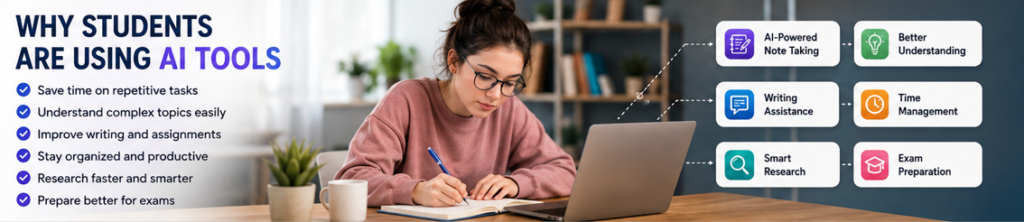
AI tools are becoming popular among students because they can handle tasks that normally take a lot of time. Instead of spending hours rewriting notes, searching for explanations, fixing grammar mistakes, or organizing study plans, students can use AI to speed up these tasks.
Here are some common reasons students use AI tools:
- to summarize long notes or articles
- to understand difficult topics in simple language
- to improve essays and assignments
- to create study plans and to-do lists
- to check grammar and spelling
- to organize lecture notes and meeting-style class notes
- to brainstorm ideas for projects and presentations
- to save time during revision and research
The goal of AI is not to do all the work for the student. The real benefit is that it helps students learn more efficiently and spend more time understanding the subject instead of getting stuck in repetitive tasks.
What Makes a Good AI Tool for Students?
Not every AI tool is equally useful for academic work. Some are made for business teams, some for content creators, and some for general productivity. For students, the best AI tools usually have features that directly support learning, writing, research, and organization.
A good student AI tool should help with:
- note-taking and summarizing
- writing and grammar improvement
- research and information organization
- brainstorming ideas
- study planning and productivity
- easy-to-use interface
- affordable or free plans
- cross-device access for laptop and mobile use
The best AI tools for students are the ones that fit naturally into daily study life without making the workflow more complicated.
Best AI Tools for Students
Below are some of the most useful AI tools for students in 2026. Each tool helps in a different way, so the best choice depends on whether you need help with writing, note-taking, research, planning, or revision.

1. ChatGPT – Best for Study Help, Brainstorming, and Explanations
ChatGPT is one of the most popular AI tools for students because it can help with many different tasks. Students can use it to understand difficult topics, generate ideas, create outlines, summarize concepts, draft study notes, and ask follow-up questions in simple language.
How students can use ChatGPT
- explain difficult concepts in simple words
- create summaries of class topics
- generate essay outlines
- brainstorm project ideas
- make revision questions and quiz prompts
- improve productivity and study planning
- rewrite notes in a cleaner format
Why it is useful
One of the biggest strengths of ChatGPT is flexibility. It works like a study assistant that can answer questions, break down complex topics, and support different kinds of school or university work.
Best for
- general study support
- essay planning
- understanding difficult subjects
- productivity help
- brainstorming and revision
2. Grammarly – Best for Writing, Grammar, and Assignment Editing
Grammarly is one of the best AI writing tools for students who want cleaner and more professional writing. It checks grammar, punctuation, spelling, clarity, and sentence structure. It is especially useful for essays, emails to teachers, reports, and research assignments.
How students can use Grammarly
- fix grammar mistakes in essays
- improve sentence clarity
- remove awkward phrasing
- check spelling before submission
- improve academic writing tone
- proofread emails and application writing
Why it is useful
Many students know the subject well but lose marks because of grammar issues or weak writing. Grammarly helps polish the final draft and makes written work more readable.
Best for
- essays
- reports
- scholarship applications
- assignment editing
- grammar correction
3. Notion AI – Best for Organizing Notes and Study Planning
Notion AI combines note-taking, planning, and productivity in one workspace. Students can use it to keep lecture notes, assignment lists, revision schedules, and project plans in one place. The AI features can summarize notes, generate content, and help organize information more quickly.
How students can use Notion AI
- organize class notes by subject
- create revision plans
- manage assignment deadlines
- summarize long notes
- turn rough notes into structured study pages
- build personal dashboards for school or college work
Why it is useful
Students often struggle with scattered notes, forgotten deadlines, and poor organization. Notion AI can act like a digital academic planner while also supporting AI-powered writing and summaries.
Best for
- note organization
- assignment tracking
- study schedules
- productivity planning
4. QuillBot – Best for Paraphrasing and Rewriting Notes
QuillBot is popular among students for paraphrasing, rewriting, and improving sentence structure. It can help students reword notes, make writing smoother, and improve the flow of assignments. It also offers grammar and summarizing features.
How students can use QuillBot
- rewrite rough paragraphs
- simplify difficult notes
- improve wording in essays
- summarize text
- make study material easier to understand
- polish first drafts before final editing
Why it is useful
Sometimes students understand a topic but struggle to write it clearly. QuillBot can help improve readability and create better phrasing without changing the meaning too much.
Best for
- paraphrasing
- rewriting notes
- improving essay flow
- summarizing study material
5. Otter.ai – Best for Lecture Transcription and Class Notes
Otter.ai is a powerful AI note-taking and transcription tool. It can turn spoken lectures, meetings, discussions, and recorded classes into written notes. This is especially useful for students who attend online classes, interviews, or lectures with lots of spoken information.
How students can use Otter.ai
- record lectures and transcribe them
- review spoken explanations later
- capture class discussions
- turn audio notes into text
- save time on manual note-taking
Why it is useful
Students cannot always write every important point during class. Otter.ai helps capture information automatically so students can focus more on listening and understanding.
Best for
- lecture transcription
- online classes
- revision from spoken lessons
- interview and discussion notes
6. Perplexity – Best for Research and Quick Information Gathering
Perplexity is useful for students who need help with research, quick answers, and finding information efficiently. It can summarize topics, answer questions, and point students toward useful sources for learning.
How students can use Perplexity
- research assignment topics
- get quick overviews of subjects
- find starting points for essays
- ask follow-up questions on complex topics
- gather ideas for presentations and reports
Why it is useful
Research can be slow when students do not know where to begin. Perplexity can speed up the early research stage and help students understand a topic before diving deeper.
Best for
- research support
- quick topic summaries
- idea gathering
- understanding new subjects
7. Canva Magic Write / AI Tools – Best for Presentations and Visual Projects
Canva is already popular for presentations, posters, and visual content, but its AI features make it even more useful for students. It can help create slides, generate design ideas, write presentation text, and improve the visual quality of academic projects.
How students can use Canva AI
- create class presentations faster
- design project covers and posters
- generate slide content ideas
- improve visual presentation of assignments
- build educational graphics and charts
Why it is useful
Students often need to present projects, create posters, or submit visually appealing work. Canva helps save time and gives a more professional look to academic content.
Best for
- presentations
- posters
- class projects
- visual assignments
8. Google Gemini – Best for Research, Writing Help, and Google Workspace Users
Google Gemini can be useful for students who already use Google Docs, Gmail, and other Google tools. It can help with drafting content, summarizing information, generating ideas, and supporting research tasks.
How students can use Google Gemini
- draft study notes and outlines
- summarize topics
- brainstorm ideas for assignments
- improve writing in Google Docs workflows
- ask subject-related questions
Why it is useful
Students already working inside Google’s ecosystem may find Gemini easy to add into their study routine, especially for writing and productivity support.
Best for
- Google Docs users
- writing support
- research help
- brainstorming
9. Speechify – Best for Listening to Study Material
Speechify is helpful for students who prefer listening instead of reading or who want to review notes while walking, traveling, or resting. It turns text into audio, making it easier to consume study material in a different format.
How students can use Speechify
- listen to notes aloud
- convert articles and PDFs into audio
- revise while multitasking
- improve focus through audio learning
- support reading-heavy subjects
Why it is useful
Not every student learns best by reading. Audio learning can help with revision, accessibility, and productivity, especially when there is a lot of material to cover.
Best for
- audio learners
- revision on the go
- reading-heavy study material
- accessibility support
10. Quizlet AI Features – Best for Flashcards and Revision Practice
Quizlet has long been useful for students, and its AI-powered features make revision even more effective. It can help create flashcards, study sets, and quick learning activities for memorization-heavy subjects.
How students can use Quizlet
- create flashcards for exams
- review key terms and definitions
- test memory with practice sets
- revise vocabulary, formulas, and facts
- build quick revision sessions before exams
Why it is useful
Many subjects require memorization, especially languages, biology, history, and exam-based study. Quizlet helps students review information in a more active and engaging way.
Best for
- flashcards
- exam revision
- memorization
- quick study sessions
Read Our Guide On:
Best AI Tools for Real Estate in 2026
How AI Tools Help Students in Real Study Life
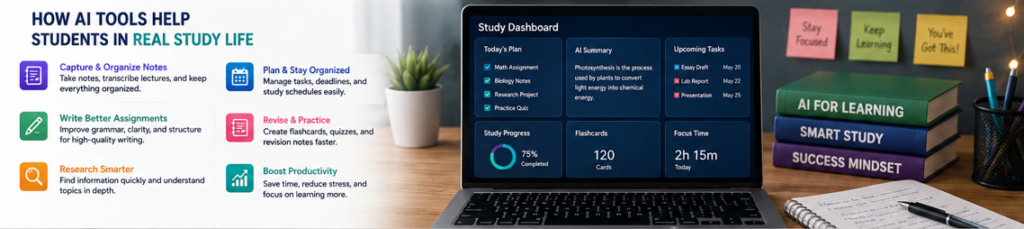
AI tools are useful because they support real academic tasks, not just general productivity. Here are some practical ways students can use them during normal study routines.
For note-taking
Tools like Notion AI and Otter.ai help students capture, organize, and summarize lecture notes more efficiently.
For writing assignments
Tools like Grammarly, ChatGPT, and QuillBot help improve writing, grammar, structure, and clarity.
For research
Tools like Perplexity and ChatGPT can help students understand a topic faster, collect ideas, and get a basic overview before deeper reading.
For exam preparation
Quizlet, ChatGPT, and note summarizing tools can help create flashcards, mock questions, and quick revision notes.
For productivity and time management
Notion AI and general AI assistants can help students build study schedules, organize deadlines, and stay focused.
For presentations and class projects
Canva AI can help with slide creation, visuals, and layout ideas for academic presentations.
How to Choose the Best AI Tool for Your Needs
Students do not need every AI tool on the market. The best approach is to choose tools based on the actual problem you want to solve.
Choose a writing tool if you struggle with:
- essays
- grammar mistakes
- awkward wording
- assignment editing
A note-taking tool if you struggle with:
- messy notes
- lecture organization
- revision planning
- capturing spoken class information
Choose a research tool if you struggle with:
- understanding new topics
- finding starting points for assignments
- gathering quick information
- organizing research ideas
Choose a productivity tool if you struggle with:
- deadlines
- poor planning
- forgetting tasks
- study routine management
Read Our Guide On:
Best AI Image Generation Tools
Tips for Using AI Tools as a Student
AI can be very helpful, but it should be used in a smart and responsible way.
1. Use AI to support learning, not replace it
AI should help you understand topics, improve your writing, and save time. It should not replace real learning or original thinking.
2. Always review AI-generated content
AI can make mistakes, give weak explanations, or produce generic answers. Always check the output before using it in assignments or study notes.
3. Do not rely on AI for facts without checking
If you are using AI for research, always verify important facts, statistics, quotations, and references.
4. Avoid submitting raw AI-written assignments
Your work should still reflect your own understanding, voice, and academic honesty. Use AI for help, editing, and planning rather than copying everything directly.
5. Start with one or two tools
Do not overload yourself with too many apps. Start with the tools that solve your biggest academic problem first.
Are AI Tools Good for School and University Students?
Yes, AI tools can be very useful for both school and university students when used properly. They can save time, reduce stress, and improve learning quality. They are especially useful for students who want help with note-taking, writing, research, revision, and productivity.
However, students should also use them responsibly. AI is a support system, not a shortcut for avoiding effort. The best results come when students use AI to understand more, organize better, and improve their own work.
Read Our Guide On:
How to Boost Your Productivity With AI Tools in 2026
Conclusion
AI tools are changing the way students study, write, and manage academic work. From grammar correction and lecture transcription to research help and revision planning, these tools can make student life easier and more productive.
The best AI tools for students are the ones that solve real study problems. If you need help writing essays, a tool like Grammarly or QuillBot may be useful. And If you struggle with note organization, Notion AI or Otter.ai can help. If you need a study assistant for brainstorming, revision, and understanding difficult concepts, ChatGPT can be a strong option.
You do not need to use every AI tool available. Start with one or two that match your needs, build them into your study routine, and use them to support your learning in a smart way. When used correctly, AI can become one of the most valuable tools in a student’s academic journey.
Read Our Guide On:
Grok AI Review: Unique Features and Benefits
FAQs
1. What are the best AI tools for students?
Some of the best AI tools for students include ChatGPT, Grammarly, Notion AI, QuillBot, Otter.ai, Perplexity, Canva AI, Google Gemini, Speechify, and Quizlet.
2. Are AI tools free for students?
Many AI tools offer free versions or limited free plans. Some also have premium plans with more features. Students can often start with the free versions first.
3. Can AI help students with homework?
AI can help students understand topics, generate ideas, improve writing, summarize lessons, and organize study tasks. It can support homework, but students should still do their own learning and checking.
4. Which AI tool is best for note-taking?
Notion AI and Otter.ai are both strong options for note-taking. Notion AI is good for organizing notes and planning, while Otter.ai is useful for transcribing lectures and spoken discussions.
5. Which AI tool is best for writing essays?
Grammarly, QuillBot, and ChatGPT can all help with essay writing. Grammarly is good for grammar and clarity, QuillBot helps with rewriting, and ChatGPT can help with outlines and idea generation.
6. Are AI tools safe for students to use?
Most well-known AI tools are safe if used carefully, but students should avoid sharing sensitive personal information and should always review privacy settings before uploading academic content or personal data.
7. Should students use AI for studying?
Yes, AI can be very helpful for studying if used responsibly. It works best as a tool for support, planning, understanding, and productivity rather than as a replacement for real learning.
Read Our Guide On:
Freepik Spaces Complete Guide – AI Workspace for Creators

Mehtab Hassan is the founder and tech writer at Brozly, where he publishes easy-to-understand articles on AI, software, cybersecurity, smartphones, laptops, and emerging technology. His goal is to help readers make smarter tech decisions through detailed reviews, practical tutorials, and beginner-friendly guides. He is passionate about exploring the latest innovations and delivering accurate, up-to-date content that everyone can understand.