Artificial intelligence is changing the way people create software. Tasks that once required developers to write and review every line of code manually can now be completed faster with the help of AI-powered tools. One tool attracting attention among developers is Cursor AI.
But what is Cursor AI, and why are so many programmers interested in using it?
Cursor AI is an AI-powered code editor designed to help developers write, understand, edit, and improve code. It combines a familiar coding environment with artificial intelligence features that can suggest code, explain programming concepts, identify problems, and help complete development tasks.
Unlike a basic text editor, Cursor can understand the context of an entire project. This makes it useful for developers working on small applications, websites, and larger software projects.
In this guide, we will explain what Cursor AI is, how it works, its main features, advantages, limitations, and whether it is worth trying in 2026.
What Is Cursor AI?
Cursor AI is an AI-powered code editor that helps developers build software with the assistance of artificial intelligence. It is designed to make programming more efficient by allowing users to describe coding tasks in natural language and receive relevant code suggestions or changes.
The editor is built around the familiar Visual Studio Code experience, making it easier for many developers to get started. Users can work with existing projects, explore their code, and use AI assistance without constantly switching between different applications.
One of its most useful capabilities is understanding the context of a codebase. Instead of looking at just one line of code, Cursor can search related files and use project information to provide more relevant suggestions.
For example, a developer could ask Cursor to create a login form, explain a particular function, or fix an error in an existing project.
Cursor then uses its AI capabilities to help complete the requested task.
How Does Cursor AI Work?
Cursor AI works by combining a code editor with AI models and tools that can understand and interact with software projects.
When a developer enters a question or instruction, Cursor uses the available project context to generate a response or suggest changes.
Here is a simplified explanation of how the process works:
1. Understanding the Codebase
Cursor can examine project files and search for relevant code. This helps it understand how different parts of an application work together.
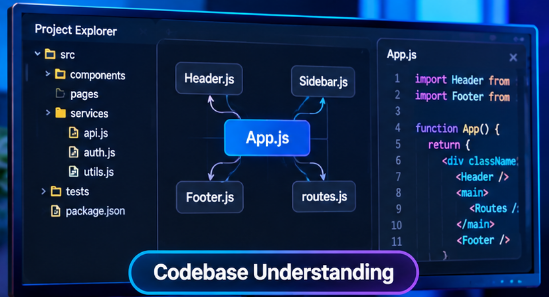
For example, if you are developing a website and ask Cursor to change the navigation menu, it can look for the files responsible for that component.
2. Processing Natural Language Instructions
Developers do not always need to write detailed programming instructions. They can explain what they want using ordinary language.
For example, you could enter:
“Create a responsive contact form with name, email, and message fields.”
Cursor can use that instruction to suggest or create the required code.
3. Generating and Editing Code
After understanding the request, Cursor can generate new code or modify existing files.
Depending on the task and selected workflow, it can make changes across multiple files rather than limiting its suggestions to a single section.
4. Reviewing and Improving Results
Developers can inspect suggested changes, test the application, and provide additional instructions when something needs improvement.
This final step is important because AI-generated code is not guaranteed to be correct or secure.
Main Features of Cursor AI
Cursor includes several features that make AI-assisted programming more practical. Here are some of its most useful capabilities.
1. AI Code Autocomplete
One of Cursor’s helpful features is AI-powered code completion.
As developers type, Cursor can suggest the next part of a function, complete multiple lines, or predict what they might want to write next.
This can reduce repetitive work and help programmers move through coding tasks more quickly.
2. Agent Mode
Agent mode allows developers to give Cursor more complex instructions.
Instead of asking for a small code suggestion, users can describe a larger task. The agent can search the codebase, edit multiple files, run terminal commands, and help investigate errors.
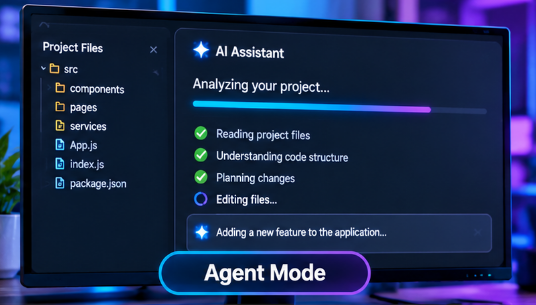
For example, a developer might ask it to add a new feature to an application and create the necessary supporting files.
Developers should still review the changes before accepting them.
3. Codebase Understanding
Understanding an existing project can take considerable time, especially when it contains many files.
Cursor can search and reference relevant parts of a codebase to help answer questions about how the project works.
This is particularly useful when joining an existing development project or working with unfamiliar code.
4. Natural Language Code Editing
Cursor allows users to describe code changes in everyday language.
For example, a developer can select a section of code and request a change without manually rewriting the entire function.
This can be useful for improving existing code, changing layouts, or understanding complicated programming logic.
5. Bug Fixing and Error Assistance
Finding programming errors is an important part of software development.
Cursor can help developers investigate errors, identify possible causes, and suggest fixes. Its agent can also run commands and work through debugging tasks.
However, developers should test proposed solutions because an AI suggestion can sometimes introduce new problems.
6. Multiple AI Models
Cursor supports different AI models and provides options for selecting models depending on the task and available plan.
Different models can have different strengths, costs, and usage limits.
This gives developers flexibility when choosing how they want to use AI assistance.
7. Terminal Integration
Cursor can work with terminal commands as part of its development workflow.
This allows it to help with tasks such as running tests, installing dependencies, and checking project errors.
Users should pay attention to commands before allowing them to run, particularly when working with important files or production environments.
What Can You Use Cursor AI For?
Cursor AI is useful for several types of software development tasks. Its capabilities are not limited to writing new code.
Here are some common examples.
Website Development
Developers can use Cursor to build website components, create responsive layouts, update existing pages, and troubleshoot front-end issues.
It can assist with common web technologies such as HTML, CSS, JavaScript, and other supported programming languages.
Software Development
Cursor can help developers create application features, organize project files, improve existing functions, and understand unfamiliar code.
It can be useful during different stages of software development, from initial coding to maintenance.
Learning Programming
Beginners can use Cursor to ask questions about programming concepts and request explanations of unfamiliar code.
For example, someone learning JavaScript could ask Cursor to explain a function step by step.
However, learners should make an effort to understand the generated code rather than simply copying it.
Debugging Existing Projects
Developers can use Cursor to investigate errors and understand why a particular feature is not working as expected.
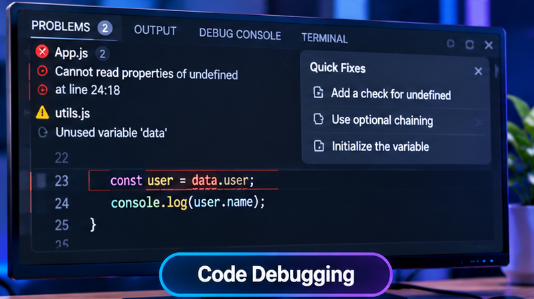
By examining relevant files and suggesting possible solutions, it can make debugging more organized.
Refactoring Code
Refactoring means improving the structure of existing code without changing its intended functionality.
Cursor can help simplify complicated functions, reduce repeated code, and make projects easier to maintain.
Benefits of Using Cursor AI
There are several reasons developers may choose Cursor over a traditional code editor.
Faster Development: AI suggestions and automated editing can reduce the time spent on repetitive programming tasks.
Less Manual Work: Developers can describe certain changes in natural language instead of writing every line themselves.
Better Project Understanding: Codebase search and contextual assistance can help developers understand unfamiliar projects.
Useful for Different Skill Levels: Experienced programmers can use it for complex tasks, while beginners can use it to explore programming concepts.
Flexible Workflow: Cursor combines code editing, AI assistance, and terminal-related workflows in one environment.
Although these benefits can improve productivity, actual results depend on the developer, project complexity, and quality of the instructions provided.
Limitations of Cursor AI
Despite its useful features, Cursor AI is not a perfect replacement for programming knowledge or human review.
Before relying on it for important projects, developers should understand its limitations.
AI Can Generate Incorrect Code
Sometimes AI-generated code looks correct but does not work as expected. It may contain logical errors, missing dependencies, or incorrect assumptions.
Developers should always test the output.
Complex Projects Require Human Understanding
Large software applications can involve complicated business rules, security requirements, and technical decisions.
Cursor can assist with these tasks, but developers still need to understand the project and make important decisions.
Usage Limits and Paid Plans
Some AI features and model usage depend on the selected subscription plan.
Users should review the current pricing and usage limits before choosing a paid plan.
Privacy and Code Security
Developers should understand how their code and project information are handled when using AI services.
Cursor provides privacy options, but organizations should review the applicable policies and settings before using it with confidential or sensitive code.
AI Does Not Replace Testing
Even when Cursor successfully generates code, that does not mean the application is ready for release.
Testing, security reviews, and human verification remain essential.
Cursor AI vs Traditional Code Editors
Traditional code editors provide tools for writing, organizing, and managing code. Cursor adds AI-powered assistance to this familiar development environment.
| Feature | Traditional Code Editor | Cursor AI |
|---|---|---|
| Writing Code | Manual coding | Manual coding and AI assistance |
| Code Suggestions | Basic autocomplete | AI-powered suggestions |
| Project Understanding | Mostly manual | AI-assisted codebase search |
| Code Editing | Manual changes | Natural language and AI-assisted edits |
| Debugging | Developer-led | AI-assisted investigation |
| Multi-file Tasks | Mostly manual | Agent-assisted changes |
| Human Review | Required | Still required |
The main difference is that Cursor can assist with more than simply writing and editing text. It can use AI to understand project context and help perform larger development tasks.
Is Cursor AI Free to Use?
Cursor offers a free plan as well as paid subscription options.
The free option provides an opportunity to explore the editor and try its AI features with limited usage. Paid plans provide different usage allowances and additional capabilities.
The exact limits and subscription details can change over time, so it is best to check the official Cursor pricing page before purchasing a plan.
Developers should compare their expected usage with the available features instead of choosing a subscription they may not need.
Is Cursor AI Good for Beginners?
Yes, Cursor AI can be useful for beginners who are learning programming.
It can explain code, suggest improvements, and help users understand why certain functions work in a particular way.
For example, a beginner building a simple website could ask Cursor to explain how a CSS layout works or why a JavaScript function is returning an unexpected result.
However, beginners should not depend entirely on AI-generated code.
Learning programming fundamentals, understanding errors, and practicing problem-solving are still important skills.
Cursor AI vs Other AI Coding Tools
Cursor is part of a growing category of AI coding tools.
Other popular options include GitHub Copilot, Claude Code, and OpenAI Codex.
These tools approach AI-assisted development in different ways.
- Cursor: Combines an AI-powered code editor with codebase understanding, code editing, and agent workflows.
- GitHub Copilot: Provides AI assistance for coding, suggestions, and development workflows.
- Claude Code: Focuses on agentic coding tasks that can involve understanding projects and modifying files.
- OpenAI Codex: Helps developers delegate coding tasks to AI agents.
The right option depends on the type of project, preferred workflow, budget, and individual requirements.
There is no single tool that is automatically best for every developer.
Is Cursor AI Worth Using in 2026?
Cursor AI is worth considering for developers who want to include artificial intelligence in their everyday coding workflow.
Its combination of code autocomplete, project understanding, natural language editing, and agent capabilities makes it a useful option for many development tasks.
It can be especially helpful when working with existing projects, building website features, debugging code, or learning unfamiliar programming concepts.
However, it should be treated as a development assistant rather than an independent replacement for a skilled programmer.
The best results come when developers use AI to reduce repetitive work while maintaining control over code quality, security, and final decisions.
Frequently Asked Questions About Cursor AI
1. What is Cursor AI used for?
Cursor AI is used for writing, editing, understanding, and debugging code. It also helps developers work with larger software projects through AI-powered assistance.
2. Is Cursor AI better than VS Code?
Cursor offers an AI-focused coding experience built around a familiar VS Code environment. Whether it is better depends on your preferred workflow and how much AI assistance you need.
3. Can beginners use Cursor AI?
Yes. Beginners can use Cursor to understand programming concepts, generate example code, and learn how different parts of an application work.
4. Does Cursor AI write code automatically?
Yes. Cursor can generate and edit code from natural language instructions. However, developers should review and test the results.
5. Is Cursor AI free?
Cursor offers a free plan with limited AI usage, along with paid plans. Current subscription details are available on its official website.
6. Can Cursor AI build websites?
Yes. Cursor can assist with website development by generating HTML, CSS, JavaScript, and other supported code. Developers still need to review and test the website.
7. Does Cursor AI replace programmers?
No. Cursor can automate or assist with many coding tasks, but programmers remain responsible for architecture, problem-solving, testing, security, and final decisions.
Final Thoughts
Cursor AI represents an important development in AI-assisted programming. By combining a familiar code editor with intelligent suggestions, project understanding, and agent-based workflows, it gives developers another way to approach software development.
Whether you are an experienced programmer or someone learning to code, Cursor can help make certain tasks easier and more efficient.
The important thing is to use it thoughtfully. AI can generate code and suggest solutions, but human understanding and proper testing are still necessary for building reliable software.