AI image generators have changed how people create graphics, artwork, social media posts, marketing materials, and website images. Whether you’re a blogger, designer, marketer, student, or business owner, AI can help you generate high-quality visuals within seconds.
However, with so many AI image generators available, choosing the right one can be difficult.
This guide compares the best AI image generation tools based on image quality, ease of use, pricing, features, customization, commercial usage, and ideal use cases. By the end, you’ll know which AI image generator is the best for your needs.
What Are AI Image Generation Tools?
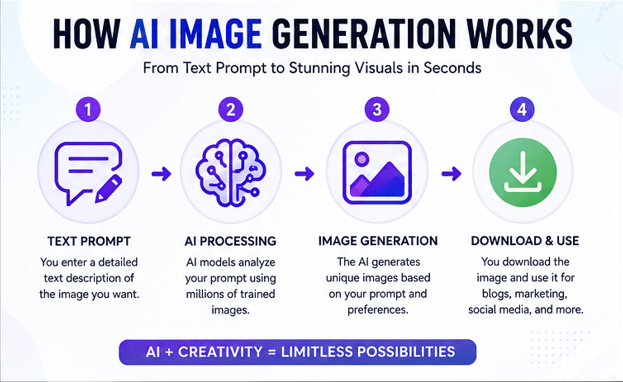
AI image generation tools are software platforms that create images from text descriptions, called prompts.
For example, you can type:
“A futuristic city at sunset with flying cars in cyberpunk style”
Within seconds, AI creates multiple unique images based on your prompt.
These tools use advanced artificial intelligence models trained on millions of images to understand styles, lighting, objects, colors, and artistic concepts.
Why AI Image Generators Are Becoming So Popular
People use AI image generators because they:
- Save time
- Reduce design costs
- Create unique artwork
- Help non-designers make professional graphics
- Generate social media content
- Design logos and concepts
- Produce marketing materials
- Improve creativity
- Generate product mockups
- Create blog featured images
Businesses, freelancers, bloggers, YouTubers, and marketers now rely on AI-generated visuals every day.
Best AI Image Generation Tools Compared
1. ChatGPT Image Generation
ChatGPT now includes powerful AI image generation capabilities that allow users to create highly detailed images directly from natural language prompts.
Best For
- Blog featured images
- Marketing graphics
- Website banners
- Educational visuals
- Illustrations
- Social media posts
Advantages
- Easy prompt writing
- Excellent image quality
- Strong understanding of detailed instructions
- Fast generation
- Multiple artistic styles
- Great for beginners
Drawbacks
- Advanced editing options are limited compared to professional design software.
Pricing
- Free version available
- Premium plans unlock more capabilities.
Read Our Guide On:
Is DeepSeek Better Than ChatGPT?
2. Midjourney
Midjourney is widely known for producing artistic, cinematic, and highly realistic images.
Many professional artists use it for concept art, fantasy illustrations, and creative projects.
Best For
- Digital artists
- Fantasy artwork
- Book covers
- Cinematic scenes
- Character design
Advantages
- Exceptional realism
- Beautiful lighting
- Artistic styles
- High-resolution outputs
- Strong community support
Drawbacks
- Learning curve for beginners
- Requires prompt experimentation
Pricing
Subscription-based.
3. Adobe Firefly
Adobe Firefly integrates with Photoshop and other Adobe Creative Cloud applications.
It focuses heavily on commercial-safe AI-generated images.
Best For
- Graphic designers
- Businesses
- Marketing teams
- Professional editing
Advantages
- Commercial-friendly
- Excellent integration with Adobe software
- High-quality text effects
- Generative Fill
- Professional workflow
Drawbacks
- Best experience requires Adobe subscription.
4. Google Imagen
Google Imagen produces realistic images with excellent prompt understanding.
Its strength lies in accurately interpreting complex descriptions.
Best For
- Photorealistic images
- Product concepts
- Marketing visuals
- Educational graphics
Advantages
- Excellent realism
- Accurate text rendering
- Detailed compositions
- High-quality outputs
Drawbacks
Availability varies depending on Google’s products and regions.
5. Microsoft Designer (Image Creator)
Microsoft Designer provides AI image generation powered by advanced AI models.
It also includes templates for social media graphics.
Best For
- Beginners
- Business graphics
- Presentations
- Social media posts
Advantages
- Very easy to use
- Fast generation
- Integrated design tools
- Free credits available
Drawbacks
Customization is less extensive than some competitors.
6. Leonardo AI
Leonardo AI is popular among game developers and digital artists.
It offers advanced customization options and multiple AI models.
Best For
- Game assets
- Character creation
- Concept art
- Product visualization
Advantages
- High image quality
- Custom AI models
- Fine-tuned control
- Community models
Drawbacks
The interface may feel overwhelming for beginners.
7. Ideogram AI
Ideogram AI stands out because it generates images with highly accurate text.
Many AI tools struggle with readable text, but Ideogram performs well in this area.
Best For
- Posters
- Logos
- Typography
- Advertising graphics
- T-shirt designs
Advantages
- Excellent text rendering
- Modern interface
- High-quality outputs
- Fast generation
Drawbacks
Artistic flexibility is slightly lower than Midjourney.
8. Stable Diffusion
Stable Diffusion is an open-source AI image generator that allows users to run models locally or through cloud platforms.
Best For
- Developers
- Researchers
- Advanced users
- Custom AI workflows
Advantages
- Free
- Open source
- Highly customizable
- Thousands of community models
Drawbacks
Requires technical knowledge for the best experience.
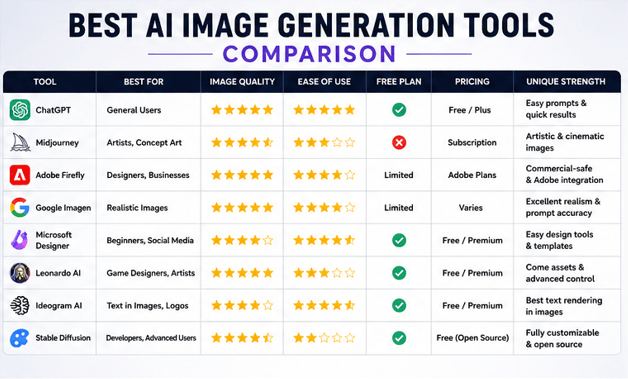
Quick Comparison Table
| Tool | Best For | Beginner Friendly | Free Plan | Image Quality |
|---|---|---|---|---|
| ChatGPT | General users | (5/5) | Yes | (5/5) |
| Midjourney | Artists | (3/5) | No | (5/5) |
| Adobe Firefly | Designers | (4/5) | Limited | (5/5) |
| Google Imagen | Realism | (4/5) | Limited | (5/5) |
| Microsoft Designer | Beginners | (5/5) | Yes | (4/5) |
| Leonardo AI | Game Design | (3/5) | Yes | (5/5) |
| Ideogram AI | Text Images | (4/5) | Yes | (4/5) |
| Stable Diffusion | Developers | (2/5) | Yes | (5/5 |
Features to Compare Before Choosing an AI Image Generator
Image Quality
Look for tools that produce:
- Sharp images
- Realistic lighting
- Natural colors
- High resolution
- Fine details
Ease of Use
Beginners should choose tools with:
- Simple interface
- Easy prompt writing
- Fast generation
- Minimal setup
Editing Features
Some AI tools allow:
- Background removal
- Object replacement
- Image expansion
- Upscaling
- Inpainting
- Style changes
Commercial Usage
Always check whether the tool allows commercial use of generated images.
Businesses should carefully review licensing terms before using AI-generated graphics for products or advertising.
Pricing
Compare:
- Free plans
- Monthly subscriptions
- Credit systems
- Enterprise plans
Choose one that fits your budget and workload.
Speed
Fast generation matters if you create:
- Daily social media posts
- Blog graphics
- Marketing campaigns
- Product images
Which AI Image Generator Is Best for Different Users?
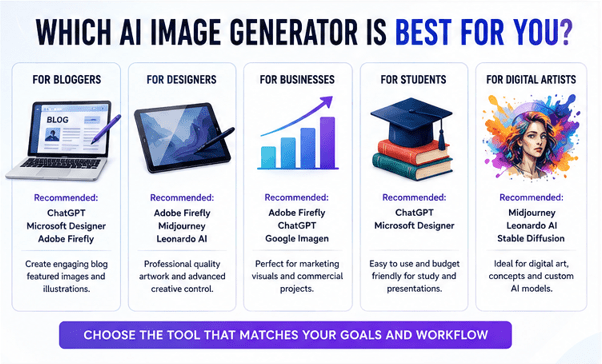
For Bloggers
Recommended:
- ChatGPT
- Microsoft Designer
- Adobe Firefly
These tools create featured images, blog graphics, and illustrations quickly.
For Graphic Designers
Recommended:
- Adobe Firefly
- Midjourney
- Leonardo AI
They offer more creative control and professional-quality outputs.
For Businesses
Recommended:
- Adobe Firefly
- ChatGPT
- Google Imagen
These tools are suitable for marketing materials and commercial projects.
For Students
Recommended:
- ChatGPT
- Microsoft Designer
They are easy to use and often include free access options.
For Digital Artists
Recommended:
- Midjourney
- Leonardo AI
- Stable Diffusion
These tools provide advanced artistic capabilities and customization.
Read Our Guide On:
How to Boost Your Productivity With AI Tools
Tips for Creating Better AI Images
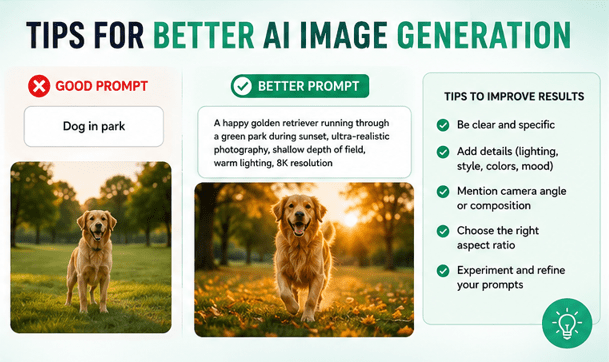
Use clear and detailed prompts.
Instead of writing:
“Dog”
Write:
“A happy golden retriever running through a green park during sunset, ultra-realistic photography, shallow depth of field, 8K resolution.”
Include details such as:
- Camera angle
- Lighting
- Colors
- Style
- Background
- Mood
- Resolution
- Artistic medium
Better prompts usually produce better images.
Common Mistakes to Avoid
Many beginners make these mistakes:
- Using very short prompts
- Ignoring aspect ratio
- Forgetting image style
- Not specifying lighting
- Overloading prompts with conflicting instructions
- Ignoring licensing rules
- Expecting perfect results on the first try
Experimentation often leads to the best outcomes.
Future of AI Image Generation
AI image generators continue to improve rapidly.
Future developments may include:
- Better realism
- Faster rendering
- Improved text accuracy
- Enhanced editing
- 3D image generation
- Video creation from prompts
- Personalized AI models
- More control over composition and style
As AI evolves, these tools will become even more useful for creators and businesses.
Read Our Guide On:
10 Best AI Tools for Students to Study Smarter in 2026
Frequently Asked Questions
Which AI image generator is best overall?
There isn’t a single best tool for everyone. ChatGPT is excellent for general users, Midjourney excels in artistic images, Adobe Firefly suits professional designers, and Leonardo AI is ideal for game artists.
Is there a free AI image generator?
Yes. ChatGPT, Microsoft Designer, Leonardo AI, Ideogram AI, and Stable Diffusion offer free access or free tiers, though usage limits may apply.
Which AI image generator creates the most realistic images?
Midjourney and Google Imagen are widely recognized for producing highly realistic and detailed images.
Which AI image tool is best for beginners?
ChatGPT and Microsoft Designer are among the easiest to use because of their simple interfaces and straightforward prompting.
Can I use AI-generated images commercially?
Many platforms allow commercial use, but the rules vary. Always review the licensing terms of the specific tool before using images for business purposes.
Which AI image generator is best for logos?
Ideogram AI is a strong choice for logos and typography because it handles text in images more accurately than many alternatives.
Do AI image generators require design skills?
No. Most tools are designed so that anyone can create images using plain-language prompts, although better prompts usually produce better results.
Are AI-generated images copyright-free?
Copyright and ownership rules depend on the platform and your local laws. Check each tool’s terms of service before publishing or selling AI-generated content.
Read Our Guide On:
Conclusion
AI image generation tools have transformed the way people create visual content. From realistic product photos to artistic illustrations and marketing graphics, today’s AI platforms make professional-quality image creation accessible to everyone.
The best choice depends on your goals. If you want an easy all-around solution, ChatGPT is an excellent option. Artists may prefer Midjourney, while Adobe Firefly is ideal for professional design workflows. Businesses can benefit from commercially focused tools, and developers may appreciate the flexibility of Stable Diffusion.
Before choosing a platform, consider image quality, ease of use, editing features, pricing, and licensing. Testing a few tools with the same prompt is often the best way to find the one that matches your creative style and workflow.
Read Our Guide On:
Grok AI Review: Unique Features and Benefits

Mehtab Hassan is the founder and tech writer at Brozly, where he publishes easy-to-understand articles on AI, software, cybersecurity, smartphones, laptops, and emerging technology. His goal is to help readers make smarter tech decisions through detailed reviews, practical tutorials, and beginner-friendly guides. He is passionate about exploring the latest innovations and delivering accurate, up-to-date content that everyone can understand.