Freepik Spaces is one of the newest AI features introduced by Freepik that helps users organize projects, generate AI images, create content, and collaborate in one place. Instead of switching between different AI tools and folders, users can manage their creative workflow inside a dedicated workspace.
Whether you’re a graphic designer, marketer, blogger, content creator, freelancer, or business owner, Freepik Spaces makes it easier to keep your AI-generated content organized and accessible.
In this guide, you’ll learn what Freepik Spaces is, how it works, its features, benefits, pricing, limitations, and how you can use it effectively.
What Is Freepik Spaces?
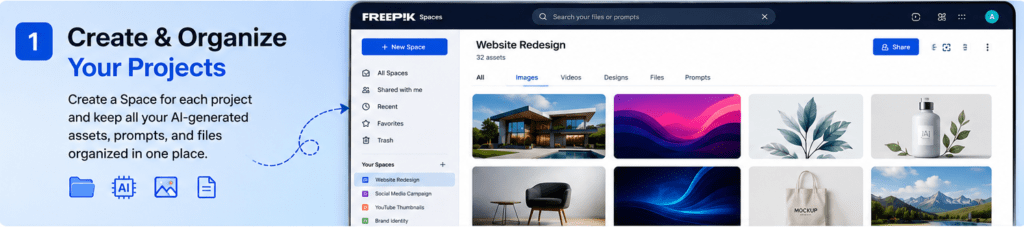
Freepik Spaces is a workspace management feature available within the Freepik platform. It allows users to organize AI-generated images, prompts, designs, files, and creative projects inside dedicated workspaces called “Spaces.”
Think of it as a digital project folder—but much smarter.
Instead of saving AI creations across different folders on your computer, you can keep everything inside Freepik, making collaboration and project management much easier.
It works alongside Freepik AI tools, including:
- AI Image Generator
- AI Video Generator
- AI Image Editor
- Background Remover
- AI Upscaler
- AI Mockup Generator
- AI Voice Generator
- AI Presentation tools
Each project can have its own Space where files, prompts, assets, and AI generations remain organized.
Why Did Freepik Create Spaces?
As AI content creation becomes more popular, creators often generate hundreds of images, prompts, and design assets.
Without proper organization, projects quickly become messy.
Freepik Spaces solves this problem by allowing users to:
- Keep projects separated
- Organize AI generations
- Store prompts
- Share work with teammates
- Improve workflow
- Save creative assets in one location
It makes project management much simpler for individuals and teams.
Key Features of Freepik Spaces

Organized Creative Workspaces
Each Space acts like its own project.
For example:
- Website redesign
- Social media campaign
- Blog graphics
- Brand identity
- YouTube thumbnails
- Product mockups
Instead of mixing everything together, every project stays organized.
AI Asset Management
Users can keep:
- AI-generated images
- Prompt history
- Edited graphics
- Mockups
- Uploaded assets
- Creative references
Everything stays connected to the project.
Easy Collaboration

If you’re working with a team, everyone can access the same project.
This reduces confusion and improves teamwork.
Collaboration helps:
- Designers
- Marketing teams
- Agencies
- Freelancers
- Businesses
Everyone works from the same creative workspace.
Faster Workflow
Instead of searching through dozens of folders, everything is available inside one Space.
This saves time when working on multiple projects.
Project Separation
Many creators work with multiple clients.
For example:
Client A
- Logo
- Banner
- Social posts
Client B
- Product images
- Advertisements
- Landing page graphics
Each client can have a separate Space.
Prompt Organization
One overlooked feature is prompt organization.
Instead of losing your best AI prompts, you can keep them with each project.
This makes future editing much easier.
Cloud-Based Storage
Because Spaces are cloud-based, your projects remain accessible from different devices.
You can continue working from:
- Desktop
- Laptop
- Tablet
Your creative files remain synchronized.
How Freepik Spaces Works
Using Spaces is straightforward.
Step 1: Create a Space
Give it a project name.
Start by creating a new workspace.
Example:
- Travel Blog
- Fitness Brand
- YouTube Channel
- Startup Website
Step 2: Add AI Creations
Generate:
- Images
- Graphics
- Icons
- Videos
- Mockups
Everything automatically stays inside that Space.
Step 3: Upload Existing Files
You can also upload:
- Logos
- Images
- Brand assets
- References
- Documents
This keeps all project resources together.
Step 4: Edit Assets
Use Freepik AI tools to:
- Remove backgrounds
- Upscale images
- Change styles
- Generate variations
- Edit objects
All edits remain connected to the project.
Step 5: Collaborate
Invite teammates or clients if collaboration is available on your plan.
Everyone works from one shared workspace.
Who Should Use Freepik Spaces?
Freepik Spaces is useful for many professionals.
Graphic Designers
Organize design projects for multiple clients.
Bloggers
Store featured images, AI graphics, blog banners, and illustrations.
Social Media Managers
Keep social campaigns organized by month or brand.
Marketing Agencies
Separate projects by client.
Store campaign assets in dedicated workspaces.
Freelancers
Manage dozens of client projects without confusion.
Small Businesses
Keep branding, product images, advertisements, and promotional materials together.
Students
Organize presentations, assignments, research graphics, and creative projects.
Benefits of Freepik Spaces
Some major advantages include:
- Better organization
- Faster project management
- Easy collaboration
- Cloud accessibility
- AI workflow optimization
- Less file clutter
- Better prompt management
- Simple navigation
- Time savings
- Professional project structure
Freepik Spaces vs Traditional Folders
| Feature | Freepik Spaces | Traditional Folders |
|---|---|---|
| Cloud access | Yes | Depends |
| AI integration | Yes | No |
| Prompt storage | Yes | No |
| Collaboration | Yes | Limited |
| Project organization | Excellent | Basic |
| AI editing tools | Built in | No |
| Creative workflow | Optimized | Manual |
Freepik Spaces vs Google Drive
| Feature | Freepik Spaces | Google Drive |
|---|---|---|
| AI image generation | Yes | No |
| Creative workspace | Yes | No |
| Prompt management | Yes | No |
| AI editing | Yes | No |
| File storage | Yes | Yes |
| Team collaboration | Yes | Yes |
Google Drive is excellent for general file storage.
Freepik Spaces is designed specifically for creative AI projects.
Read Our Guide On:
10 Best AI Tools for Students to Study Smarter in 2026
Best Practices for Using Freepik Spaces
Create Separate Spaces
Avoid mixing different projects.
One project should have one Space.
Name Projects Clearly
Examples:
- Website Redesign
- Summer Campaign
- Product Launch
- Blog Graphics
Clear names improve organization.
Save Your Best Prompts
Successful prompts are valuable.
Keep them inside the project for future use.
Keep Brand Assets Together
Store:
- Logos
- Fonts
- Colors
- Product photos
- Templates
This improves consistency.
Regularly Organize Files
Delete unused AI generations.
Keep only the best versions.
Possible Limitations
Although Freepik Spaces is useful, it has a few limitations.
These may include:
- Some collaboration features may require a paid plan.
- Storage limits can depend on your subscription.
- Internet access is required because the platform is cloud-based.
- Advanced features may not be available on free accounts.
- The feature is primarily designed for users already working within the Freepik ecosystem.
Tips to Get the Most Out of Freepik Spaces
To maximize productivity:
- Create a separate Space for each client.
- Use consistent file naming.
- Save reusable prompts.
- Organize assets into logical groups.
- Keep reference images inside the same project.
- Use AI editing tools without leaving the workspace.
- Review and clean up projects regularly.
Is Freepik Spaces Free?
Freepik offers both free and premium plans.
Basic access to Spaces may be available for free, but advanced features, higher storage limits, collaboration tools, and premium AI capabilities are generally included with paid subscriptions.
The exact features available depend on your current Freepik plan.
Is Freepik Spaces Worth Using?
If you regularly create AI-generated content, the answer is yes.
Instead of juggling multiple folders, prompts, and files across different platforms, Freepik Spaces brings everything together in one organized environment.
It is particularly valuable for:
- Designers
- Content creators
- Bloggers
- Marketing agencies
- Freelancers
- Businesses
- Students
For anyone using Freepik’s AI tools frequently, Spaces can significantly improve productivity and project organization.
Read Our Guide On:
How to Boost Your Productivity With AI Tools in 2026
Frequently Asked Questions (FAQs)
1. What is Freepik Spaces?
Freepik Spaces is a project workspace feature that helps users organize AI-generated images, prompts, creative assets, and files within the Freepik platform.
2. Is Freepik Spaces free to use?
Freepik offers free and paid plans. Some Spaces features may be available for free, while advanced capabilities often require a premium subscription.
3. Can I collaborate with my team in Freepik Spaces?
Yes. Depending on your plan, you may be able to share workspaces and collaborate with teammates on creative projects.
4. What can I store in a Space?
You can store AI-generated images, prompts, uploaded files, graphics, mockups, references, and other project-related assets.
5. Is Freepik Spaces only for designers?
No. Bloggers, marketers, freelancers, businesses, students, and content creators can all benefit from using Spaces.
6. Can I access my Spaces from multiple devices?
Yes. Since Spaces is cloud-based, you can access your projects from compatible devices using your Freepik account.
7. Does Freepik Spaces work with AI tools?
Yes. It is designed to integrate with Freepik’s AI tools, allowing you to create, edit, and organize content in one workspace.
8. Why should I use Freepik Spaces instead of regular folders?
Freepik Spaces combines project organization with AI creation and editing tools, making it easier to manage creative workflows than traditional file folders.
Read Our Guide On:
Grok AI Review: Unique Features and Benefits
Conclusion
Freepik Spaces is a practical solution for anyone who wants to organize AI-powered creative projects more efficiently. Instead of managing scattered files and prompts across multiple folders, you can keep everything related to a project in one centralized workspace.
For bloggers, designers, freelancers, marketers, businesses, and students, Spaces helps simplify project management, improve collaboration, and speed up the creative process. As AI-generated content becomes increasingly common, having a dedicated workspace can save time, reduce clutter, and make it easier to stay organized.
Read Our Guide On:
Comparing Best AI Image Generation Tools

Mehtab Hassan is the founder and tech writer at Brozly, where he publishes easy-to-understand articles on AI, software, cybersecurity, smartphones, laptops, and emerging technology. His goal is to help readers make smarter tech decisions through detailed reviews, practical tutorials, and beginner-friendly guides. He is passionate about exploring the latest innovations and delivering accurate, up-to-date content that everyone can understand.